
 Blog
Blog Every network engineer knows what it’s like to push a change through an automated workflow and watch it unexpectedly break something. If you have gaps in your understanding of the network—as most organizations do—then even routine Ansible playbooks can result in errors.
At the enterprise scale, it can be especially difficult to close network visibility gaps and find the data you need to make more controlled changes. Usually network teams cobble together their data across several siloed sources, from Visio diagrams to Excel spreadsheets to management tools. However, by the time you’re ready to use this data, odds are it’s already obsolete. A new device gets added here, a configuration gets updated there, and it’s all too easy for changes to slip past formal controls without being documented.
If you run automated workflows on stale data, you’ll see the consequences in three key areas:
- Network performance: Changes carry an increased risk of outages and performance degradation. This applies to routine updates as well as large-scale projects like M&As, cloud migrations, and SD-WAN rollouts.
- Security and regulatory compliance: During audits you have no way to prove that your security and regulatory controls are behaving in line with leading frameworks.
- Operational cost: Projects run over their planned schedules and budgets, making it difficult to earn buy-in for cost-saving initiatives like automation and AIOps.
The good news? Accurate, automation-ready network data is well within reach. In this blog, we’ll show you how to use IP Fabric’s NetBox plugin to build a complete and reliable understanding of your actual network state, so you can maintain a more resilient and secure network. But before we get into the workflow itself, let’s quickly cover what IP Fabric and NetBox actually do, and why they’re better together.
How Do IP Fabric and NetBox Fit Into the Network Automation Ecosystem?
There are a lot of tools involved in network governance, and it’s not always obvious where one ends and the next begins.
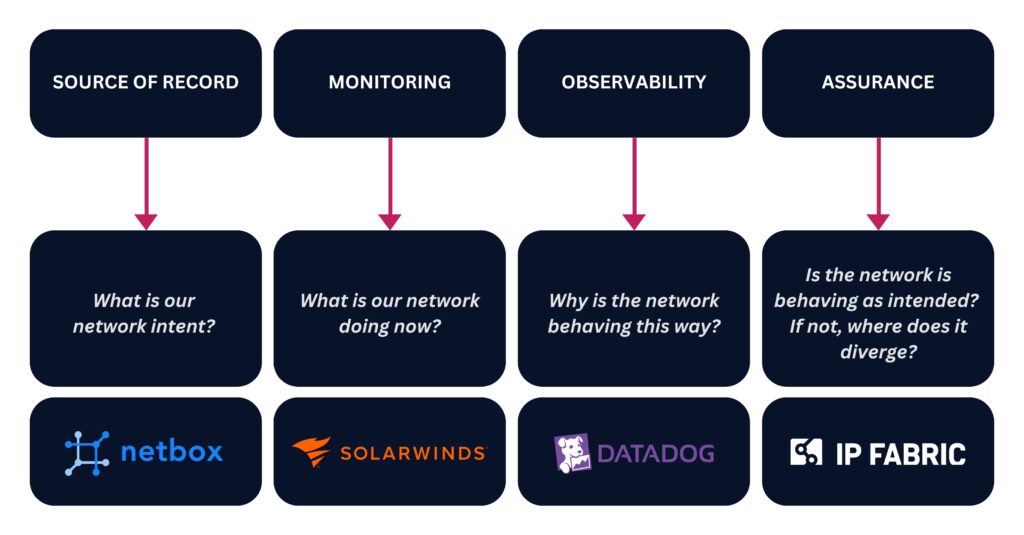
Generally speaking, there are four types of governance tools, and each one answers a different question about your network.
- Source of record: Tools like NetBox store the blueprint of what your network should look like.
- Monitoring: Tools like SolarWinds and Zabbix tell you what your network is doing right now.
- Observability: Tools like Datadog, Dynatrace, and ThousandEyes tell you why your network is behaving the way it is.
- Assurance: Digital twin platforms like IP Fabric can see what your network actually looks like at a given point in time, and prove that it’s working as intended.
Learn how to improve your monitoring and observability tools with a network digital twin.
NetBox and IP Fabric are fundamentally different tools; think of NetBox as your source of network intent, and IP Fabric as your source of network reality.
By itself, NetBox is a place to document the ideal state of your network assets and configurations. Most teams maintain their NetBox instance with custom scripts and manual updates, but these approaches are difficult to keep up, which means that your network intent can all too easily drift from what’s actually going on in your network. NetBox doesn’t inherently know when this drift occurs. (But if it did, that would be a good place to kick off automated remediation.)
This is where IP Fabric comes in. It continuously discovers every device, connection, and configuration in your network, generating an end-to-end network snapshot of your actual network state at a given moment in time. By comparing this snapshot with your NetBox instance, you can quickly surface any and all differences between your network intent and your network reality. Once you pinpoint these differences, you can use them to:
- Initiate automated change management workflows in tools like ServiceNow and Ansible.
- Validate every change and automated workflow after it runs to ensure continuous network resilience, security, and compliance.
- Keep your source of record up to date.
Now let’s see what this looks like in a sample workflow.
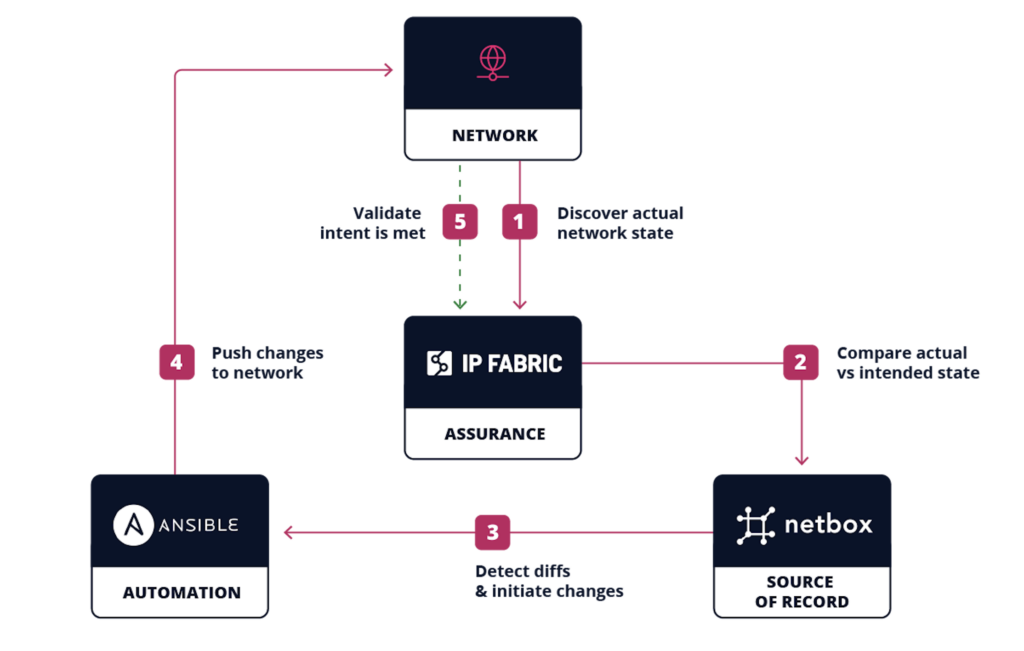
5 Steps to NetBox Automation with IP Fabric
Talk to an expert for a personalized demo of our NetBox plugin.
Step 1: Discover Your Network
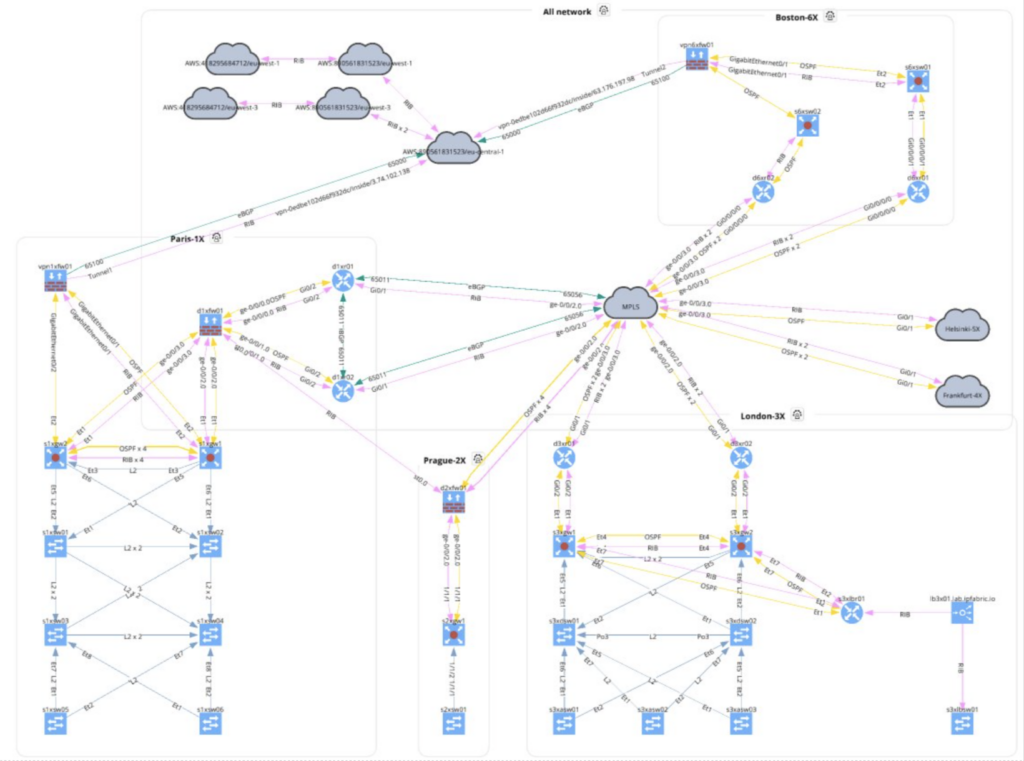
Everything starts with a snapshot. IP Fabric uses CLI commands and API calls to communicate with each device in your network, mapping its neighbors until 100% of them are discovered, whether they were previously logged in NetBox or not.
IP Fabric also captures every configuration, dependency, and protocol, and normalizes this data to build a vendor-neutral digital twin of your network. This normalization step is especially important when it comes to automation, as you have to make sure that your data is structured in a way that will work across every tool and AI agent in your automation ecosystem.
Learn about IP Fabric’s end-to-end discovery.
Step 2: Compare Your Actual Vs. Intended Network State
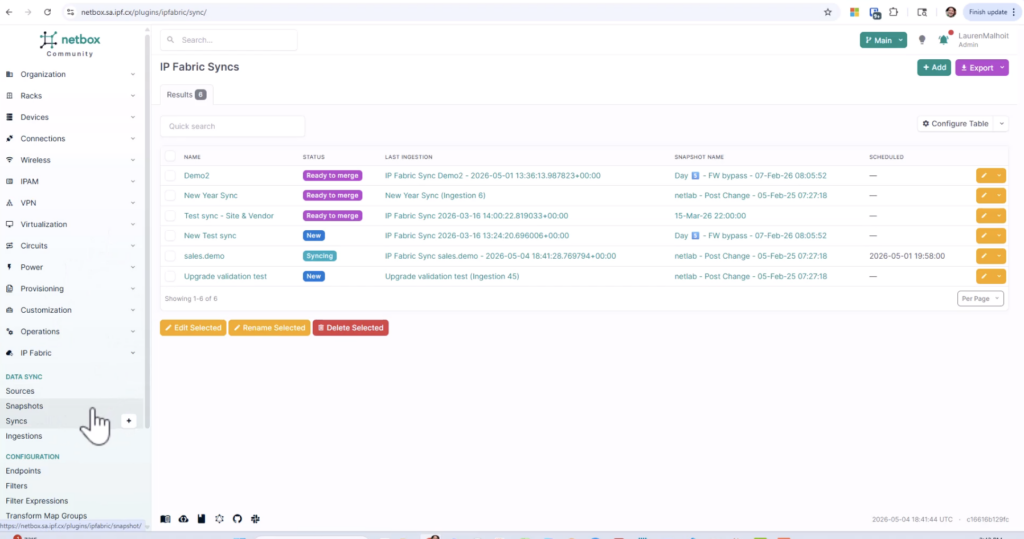
When IP Fabric compares network data with NetBox, it creates a new branch rather than writing over your existing NetBox records. This way, you can easily spot any differences between your intended network state (your existing NetBox documentation) and your actual network state (the new branch created by IP Fabric).
Learn how IP Fabric syncs with NetBox.
Step 3: Detect Diffs & Initiate Changes
Once you have a breakdown of the differences between IP Fabric and NetBox, it’s up to your team to decide if you want to remediate them or not. Not every difference needs to be remediated; for example, another team may have already requested a given change window, which means that a change may exist in NetBox as intent, but it hasn’t been provisioned in the actual network yet.
When a difference does require action, then IP Fabric can initiate a webhook to populate a ServiceNow ticket with information on relevant devices and configurations. From there, the ticket kicks off a standard change management workflow, ready for approval and provisioning.
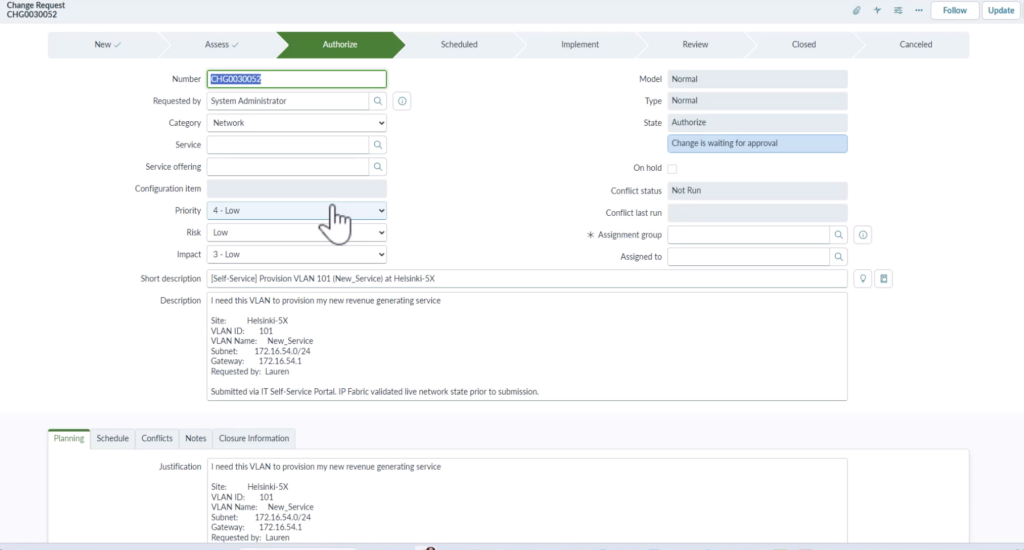
Learn how IP Fabric works with ServiceNow.
Step 4: Push Changes to Your Network
After the ticket is approved, the actual change is handled by your automation tool. IP Fabric’s role at this stage is twofold: first it makes sure your automation tool is working with accurate data, and then it validates the change once it’s been implemented.
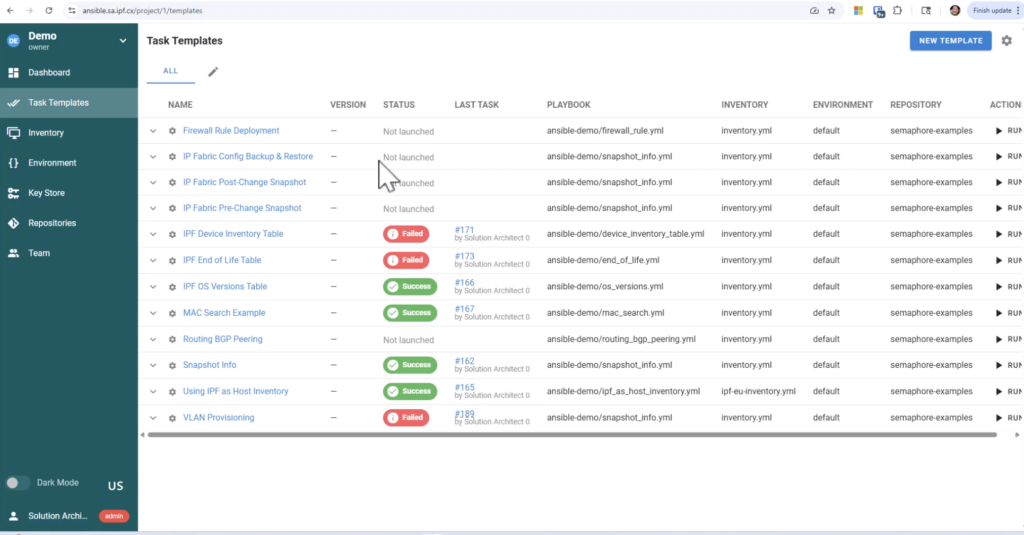
Learn how IP Fabric works with Ansible.
Step 5: Validate That Intent is Met
By running snapshots before and after every change, you de-risk automation at scale. In every snapshot, IP Fabric runs a series of intent checks to confirm the network is still aligned with your security, regulatory, and operational standards. The results are automatically gathered into multi-view dashboards, where anyone from executives to auditors can get the proof of compliance they need.
Now all that’s left is to merge that new NetBox branch into main, and you’re done. If something didn’t go to plan, IP Fabric’s historical snapshots and configuration backups offer an easy route to roll changes back.
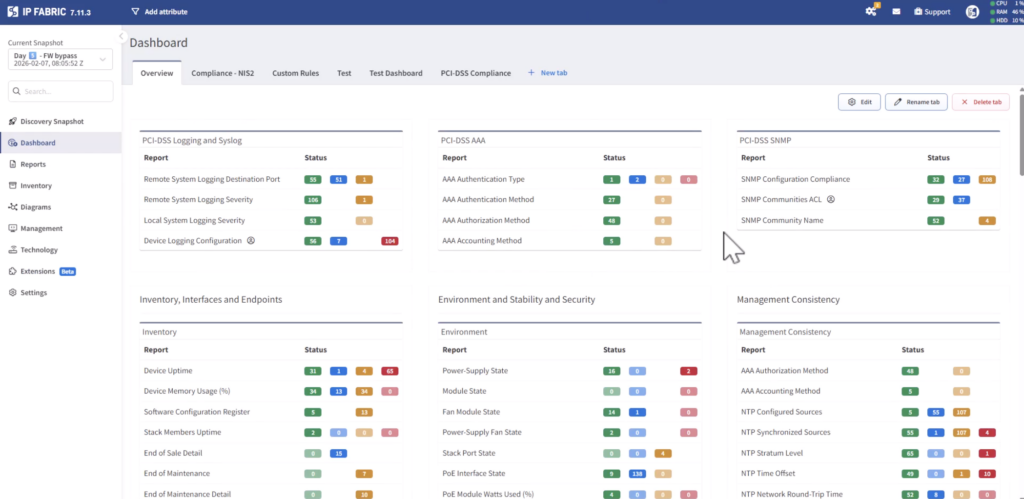
Learn more about IP Fabric’s intent checks.
TL;DR, you need the following for reliable network automation:
- A source of intent.
- A source of reality to compare against that source of intent, and to initiate the automated change process.
- A tool to orchestrate the automated changes.
- A process to verify that changes were implemented as intended.
All together, this creates a continuous feedback loop that’s crucial for building a resilient, secure, and compliant network. IP Fabric’s NetBox plugin plays a foundational part in that feedback loop, empowering your team to make confident strides towards network automation and AIOps.
Ready to see IP Fabric’s NetBox plugin in action? Contact our team for a personalized demo.
FAQs
How Often Should I Sync NetBox With IP Fabric?
Our NetBox plugin offers three different options for syncing NetBox with IP Fabric. You can choose to kick off syncs:
- Whenever you run a new snapshot.
- On an automated schedule.
- Manually / on demand.
For most teams it makes sense to sync whenever you run a new snapshot, so your NetBox instance stays up to date without any additional manual effort.
How Does IP Fabric Help With NetBox Asset Management?
Every time IP Fabric discovers your network, it draws data on each device’s serial number, model, operating system, lifecycle status, and more. All of this data can be synced with NetBox to ensure that your IPAM, OT inventory, and other assets are documented accurately, and that they’re compliant with leading security and regulatory standards.
Will IP Fabric’s NetBox Plugin Overwrite Existing Data?
No. Every sync creates a new branch in NetBox using IP Fabric’s latest snapshot, leaving your main branch untouched until your team merges the changes in. This gives you a chance to review every change before it becomes part of your source of record.
How Does IP Fabric’s NetBox Plugin Support Large-Scale Environments?
Our NetBox plugin is built to handle the realities of operating an enterprise network. Most notably this plugin gives enterprises the ability to:
- Sync over 10,000 devices between IP Fabric and NetBox in every snapshot.
- Run multiple parallel syncs at once, each with a configurable thread count.
- Choose to sync your entire environment or only specific segments of your environment.
- Get phase-level error tracking for faster troubleshooting.
- Improve data fidelity with hierarchy modeling that reflects parent / child relationships.
These features help enterprises to build a strong foundation of network data to de-risk change management and embrace network automation—all while ensuring continuous security and regulatory compliance.
Take the first step towards faster and more reliable network automation. Get in touch for a demo today.