
 Blog
Blog Every network engineer knows what it’s like to push a change through an automated workflow and watch it unexpectedly break something. If you have gaps in your understanding of the network—as most organizations do—then even routine Ansible playbooks can result in errors.
At the enterprise scale, it can be especially difficult to close network visibility gaps and find the data you need to make more controlled changes. Usually network teams cobble together their data across several siloed sources, from Visio diagrams to Excel spreadsheets to management tools. However, by the time you’re ready to use this data, odds are it’s already obsolete. A new device gets added here, a configuration gets updated there, and it’s all too easy for changes to slip past formal controls without being documented.
If you run automated workflows on stale data, you’ll see the consequences in three key areas:
- Network performance: Changes carry an increased risk of outages and performance degradation. This applies to routine updates as well as large-scale projects like M&As, cloud migrations, and SD-WAN rollouts.
- Security and regulatory compliance: During audits you have no way to prove that your security and regulatory controls are behaving in line with leading frameworks.
- Operational cost: Projects run over their planned schedules and budgets, making it difficult to earn buy-in for cost-saving initiatives like automation and AIOps.
The good news? Accurate, automation-ready network data is well within reach. In this blog, we’ll show you how to use IP Fabric’s NetBox plugin to build a complete and reliable understanding of your actual network state, so you can maintain a more resilient and secure network. But before we get into the workflow itself, let’s quickly cover what IP Fabric and NetBox actually do, and why they’re better together.
How Do IP Fabric and NetBox Fit Into the Network Automation Ecosystem?
There are a lot of tools involved in network governance, and it’s not always obvious where one ends and the next begins.
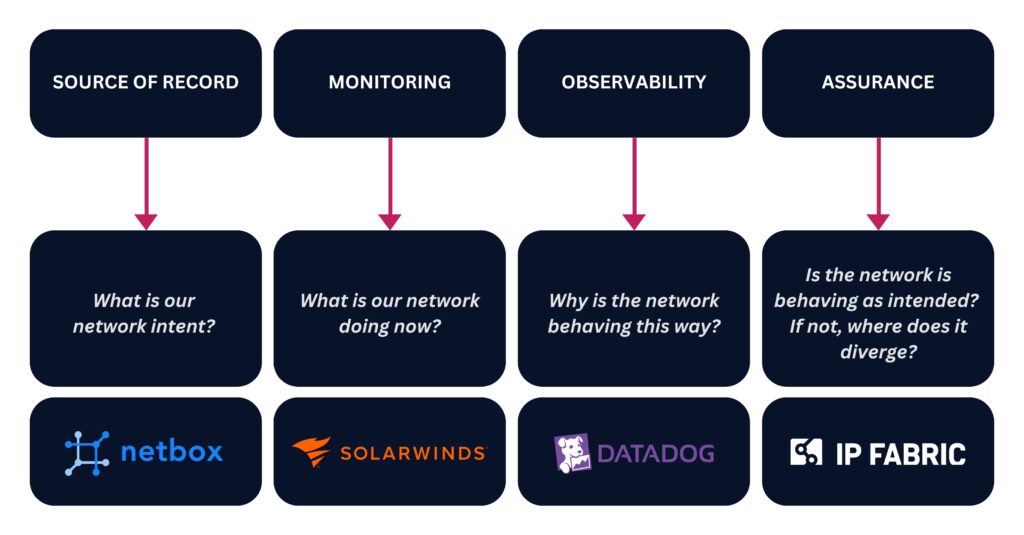
Generally speaking, there are four types of governance tools, and each one answers a different question about your network.
- Source of record: Tools like NetBox store the blueprint of what your network should look like.
- Monitoring: Tools like SolarWinds and Zabbix tell you what your network is doing right now.
- Observability: Tools like Datadog, Dynatrace, and ThousandEyes tell you why your network is behaving the way it is.
- Assurance: Digital twin platforms like IP Fabric can see what your network actually looks like at a given point in time, and prove that it’s working as intended.
Learn how to improve your monitoring and observability tools with a network digital twin.
NetBox and IP Fabric are fundamentally different tools; think of NetBox as your source of network intent, and IP Fabric as your source of network reality.
By itself, NetBox is a place to document the ideal state of your network assets and configurations. Most teams maintain their NetBox instance with custom scripts and manual updates, but these approaches are difficult to keep up, which means that your network intent can all too easily drift from what’s actually going on in your network. NetBox doesn’t inherently know when this drift occurs. (But if it did, that would be a good place to kick off automated remediation.)
This is where IP Fabric comes in. It continuously discovers every device, connection, and configuration in your network, generating an end-to-end network snapshot of your actual network state at a given moment in time. By comparing this snapshot with your NetBox instance, you can quickly surface any and all differences between your network intent and your network reality. Once you pinpoint these differences, you can use them to:
- Initiate automated change management workflows in tools like ServiceNow and Ansible.
- Validate every change and automated workflow after it runs to ensure continuous network resilience, security, and compliance.
- Keep your source of record up to date.
Now let’s see what this looks like in a sample workflow.
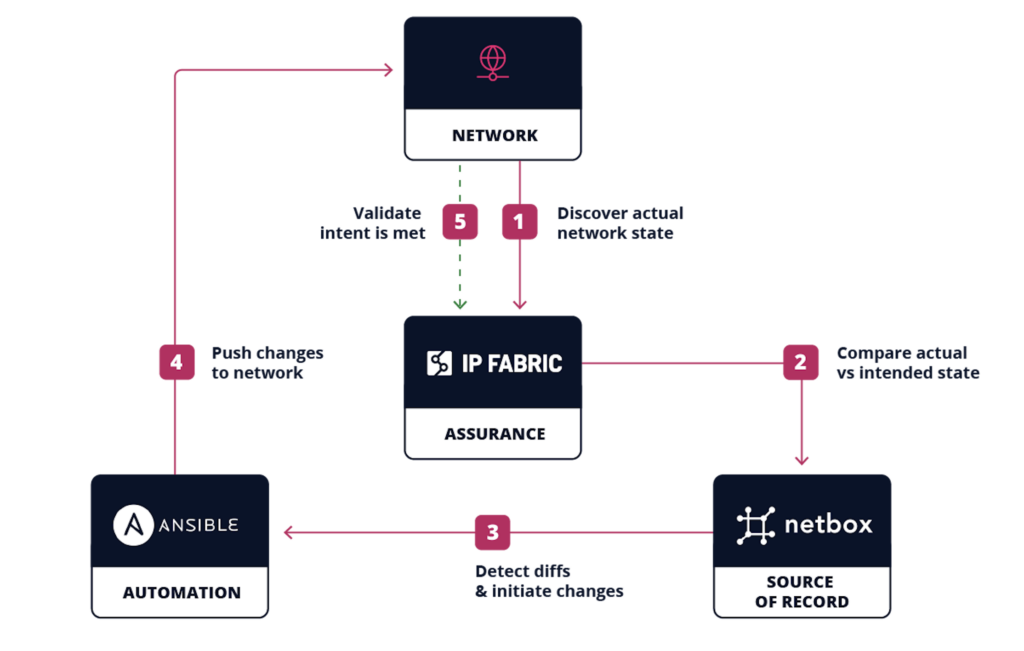
5 Steps to NetBox Automation with IP Fabric
Talk to an expert for a personalized demo of our NetBox plugin.
Step 1: Discover Your Network
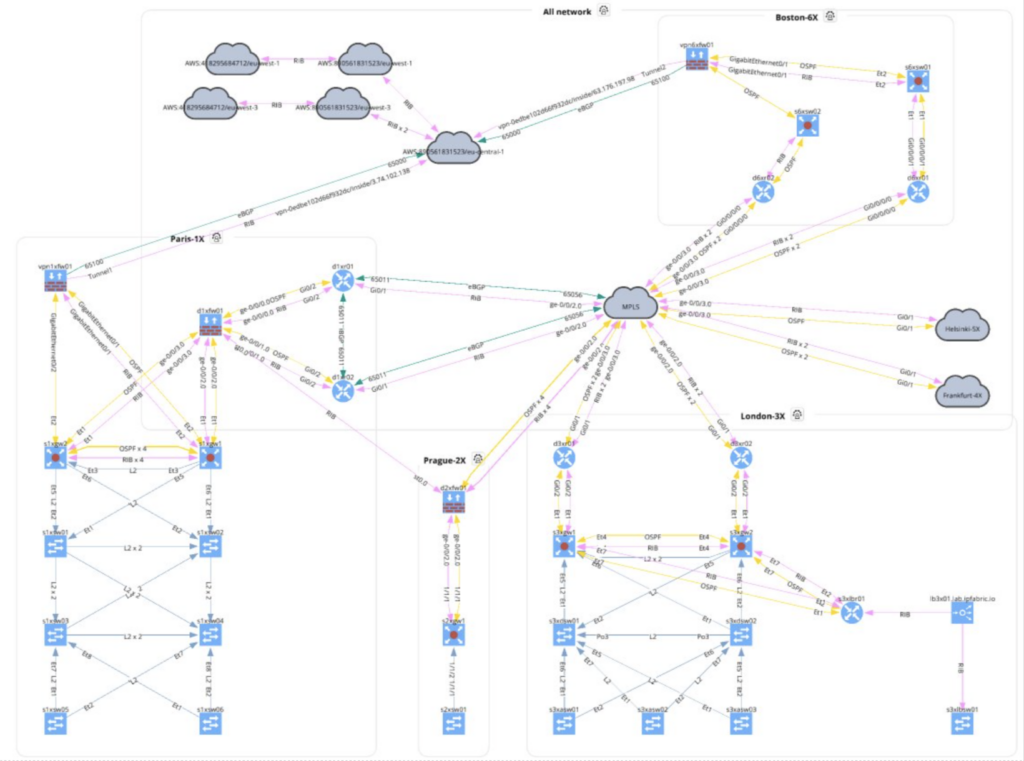
Everything starts with a snapshot. IP Fabric uses CLI commands and API calls to communicate with each device in your network, mapping its neighbors until 100% of them are discovered, whether they were previously logged in NetBox or not.
IP Fabric also captures every configuration, dependency, and protocol, and normalizes this data to build a vendor-neutral digital twin of your network. This normalization step is especially important when it comes to automation, as you have to make sure that your data is structured in a way that will work across every tool and AI agent in your automation ecosystem.
Learn about IP Fabric’s end-to-end discovery.
Step 2: Compare Your Actual Vs. Intended Network State
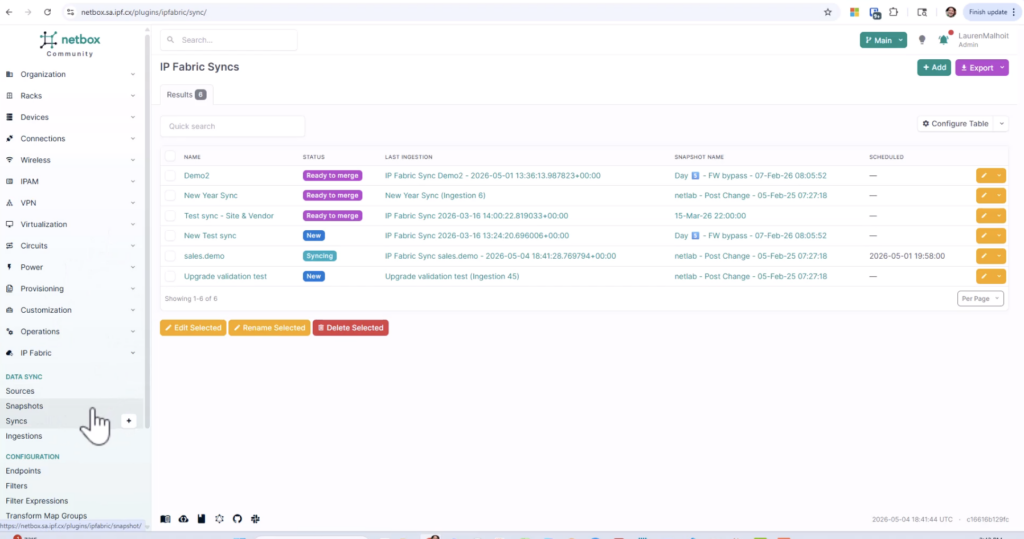
When IP Fabric compares network data with NetBox, it creates a new branch rather than writing over your existing NetBox records. This way, you can easily spot any differences between your intended network state (your existing NetBox documentation) and your actual network state (the new branch created by IP Fabric).
Learn how IP Fabric syncs with NetBox.
Step 3: Detect Diffs & Initiate Changes
Once you have a breakdown of the differences between IP Fabric and NetBox, it’s up to your team to decide if you want to remediate them or not. Not every difference needs to be remediated; for example, another team may have already requested a given change window, which means that a change may exist in NetBox as intent, but it hasn’t been provisioned in the actual network yet.
When a difference does require action, then IP Fabric can initiate a webhook to populate a ServiceNow ticket with information on relevant devices and configurations. From there, the ticket kicks off a standard change management workflow, ready for approval and provisioning.
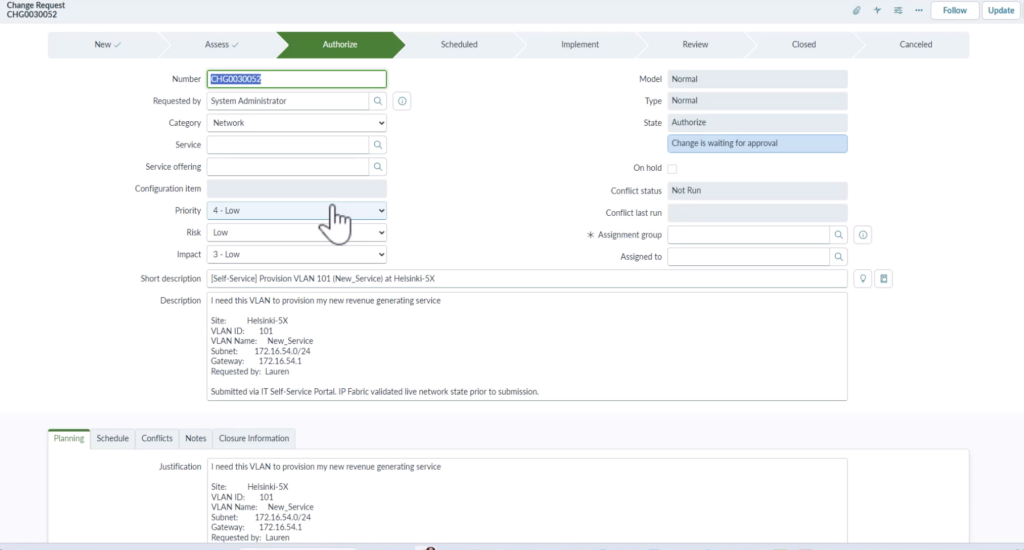
Learn how IP Fabric works with ServiceNow.
Step 4: Push Changes to Your Network
After the ticket is approved, the actual change is handled by your automation tool. IP Fabric’s role at this stage is twofold: first it makes sure your automation tool is working with accurate data, and then it validates the change once it’s been implemented.
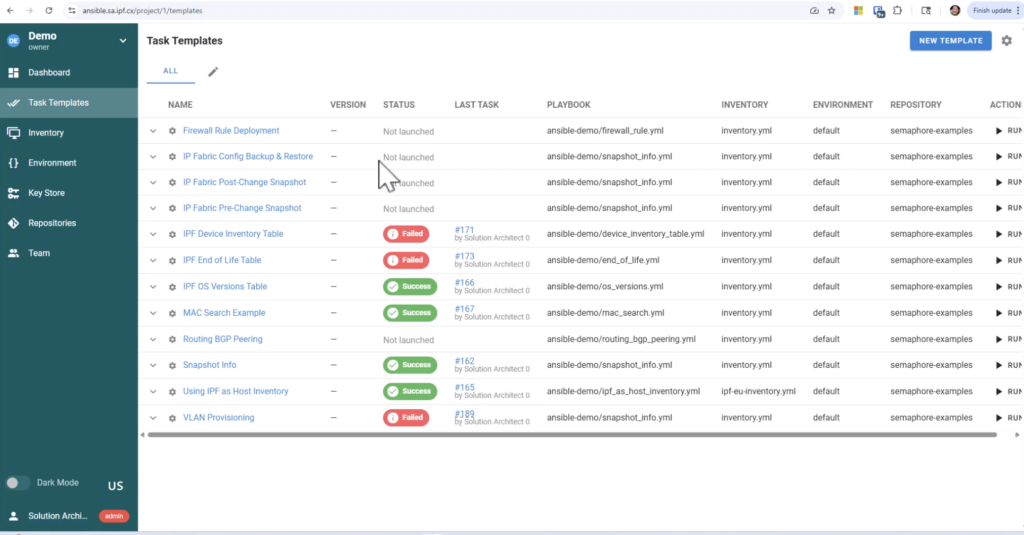
Learn how IP Fabric works with Ansible.
Step 5: Validate That Intent is Met
By running snapshots before and after every change, you de-risk automation at scale. In every snapshot, IP Fabric runs a series of intent checks to confirm the network is still aligned with your security, regulatory, and operational standards. The results are automatically gathered into multi-view dashboards, where anyone from executives to auditors can get the proof of compliance they need.
Now all that’s left is to merge that new NetBox branch into main, and you’re done. If something didn’t go to plan, IP Fabric’s historical snapshots and configuration backups offer an easy route to roll changes back.
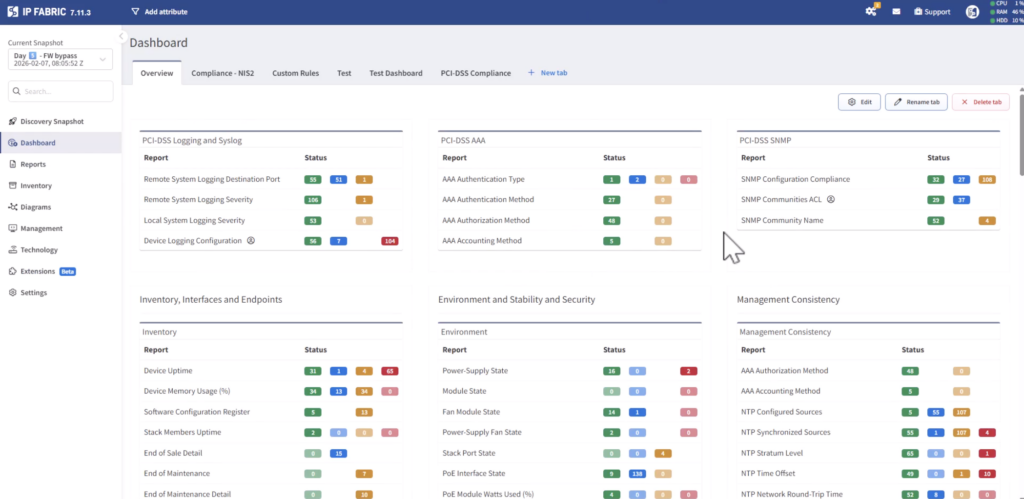
Learn more about IP Fabric’s intent checks.
TL;DR, you need the following for reliable network automation:
- A source of intent.
- A source of reality to compare against that source of intent, and to initiate the automated change process.
- A tool to orchestrate the automated changes.
- A process to verify that changes were implemented as intended.
All together, this creates a continuous feedback loop that’s crucial for building a resilient, secure, and compliant network. IP Fabric’s NetBox plugin plays a foundational part in that feedback loop, empowering your team to make confident strides towards network automation and AIOps.
Transcript
Welcome everyone. Today I’m going to
demo some of the uh capabilities that
we’ve created using uh an internal
self-service portal kind of mimicking
what you probably are already running in
your environments or if you’re not using
a self-service portal, you know, the
Ansible playbooks or Python scripts or
or things like that um to automate some
commonly done activities. We’re also
going to show how you can better utilize
the the technical stack that you’re
already working with. Um, so you can see
at the top of this internally built
portal, uh, our IP fabric netbox
integration sync status. And what I have
here is just the ability to show what’s
happening um, in our IP fabric netbox
integration. So we have an official
Netbox integration. I can actually
trigger uh syncing right from my
self-service portal. But if I want to
pop into Netbox and see a little bit
about what that looks like, I can see
I’ve triggered this job. So I’m here in
the community of edition of Netbox. If I
scroll down, I can see that IP Fabric
integration. And of course, we have tons
of of things that you can look through.
We’re going to sync that information,
sync all of the the network information
that IP Fabric gathers, which is
incredibly uh it’s it’s a the most
accurate discovery on the market today
because of the way that we do our
discovery. And therefore we can update
um your your netbox, your other DSIMs,
your CMDBs, your IPAMS, uh any source of
truth really um because of our
incredibly accurate discovery so that
you’re not looking at stale records um
and trying to you know work with your
compliance teams, work with your finance
teams, work with renewals and all of
that um with stale information.
So that’s kind of the the idea behind
this IP fabric netbox integration.
Again, we’re just bringing incredibly
accurate information to this source of
truth that you might be using. If I go
back to my uh self-service portal, I can
see, you know, again, I have a job
syncing already. It’s reminding me
because of the version that I’m working
with, the latest version. I can actually
um trigger this automatically. So I have
uh web hook triggers available. Every
time uh a snapshot finishes, I can
trigger it to do a sync with NetBox. So
we’re always constantly up todate. And
then branch um branching is enabled as
well if you’re familiar with the coding
term branching. So basically we can
branch this information and then merge
it into main when we’re ready when we’re
sure that we are ready to do our merges.
And maybe you saw that here. Uh you can
see my demo 2 is ready to merge. I’ve
already run a sync and and we can merge
that information to make sure that you
know we’re not working with multiple uh
versions of of what’s actually on hand.
And then to kind of tell the story a
little bit further, I’ll run this VLAN
provisioning uh service from my
self-service catalog. And you know, this
is a pretty common activity where we
want to just make a new VLAN available
on our switches in let’s say Helsinki.
So, I’m going to put in a new VLAN uh
that I want provisioned. And we’ll say
um new service. That’s not a great name,
but for the sake of the demo, that’ll
work. Um we’ll select a subnet. Now, all
of this information, especially from the
pulld downs, is available because of IP
Fabric. It’s actually pulling this
information from the IP Fabric APIs into
my self-service portal with just some
really easy API calls. And of course, we
always need a justification because
eventually this is going to turn into a
change management ticket. So I need this
VLAN to provision my new revenue
generating service
and then of course who it’s requested by
and we’ll validate with IP fabric. Now
here we go. We we always want to
validate and make sure VLAN 100 is
available. And IP Fabric actually says
that it is available. And I can pop in
through my deep link back to IP Fabric
and see what this is all about. And I
see VLAN 100. So why is it telling me
it’s not available? Well, because it’s
actually not um taken in the Helsinki
site. If you’ll recall, we chose
Helsinki. Um so we still have VLAN 100
available there. So that’s all good.
That’s correct. But Netbox is showing
that VLAN 100 is already allocated. And
a couple things could be happening here.
So maybe we haven’t done a sync recently
with uh the Netbox integration and we
need to do that sync because maybe we’re
seeing some stale records or a really
legitimate reason why VLAN 100 might be
showing up in Netbox is that maybe
another team, another person has already
requested that VLAN but hasn’t had the
change management window yet uh to
provision it for real on the switches.
So IP Fabric wouldn’t know about it yet.
IP Fabric knows what’s actually
happening on your network today. Netbox
is showing you what your intent is for
tomorrow maybe or next weekend. So no
problem. We’ll go ahead and use one of
these suggested VLANs and we’ll go
through the validation again. And now we
see, okay, the subnet that we selected,
the VLAN that we selected is available.
We could go back into IP Fabric and and
you know validate that. But I’m going to
go ahead and confirm and provision. Now
here I’m not actually provisioning that
new VLAN on my my switch interfaces
right what I what I want to do is
actually create a change request ticket
because you know I work for a large
enterprise and all of this will need to
go through uh during a change management
window and of course the first thing is
to get approved during for that change
management window. So what I’ve done
here is I’ve automated the uh population
of a service now ticket then and again
all of this information comes from
either templates from the back end of my
self-service portal but the the actual
data comes from IP fabric itself and so
if I scroll down I can actually see okay
this comes from the self-service portal
I entered in my justification
um all of the subnet information the
gateway information again comes from IP
fabric and And through templates, I’ve
said, okay, every time I provision a new
VLAN, then we need to run through phase
one, which is a pre-change snapshot. And
I already have an Ansible playbook set
up to do a pre-change snapshot. So
that’s going to be the first thing that
gets run in an automated way, right,
through an ansible playbook. And I do
have that set up um with Ansible
Semaphore here. You know, again, we’re
we’re working with a lab situation, so
this is kind of a lighter version of of
tower basically. But whatever you’re
using um for automation, whether it’s
Ansible or Terraform, Python scripts, it
doesn’t matter. Um I’m just showing how
this all kind of works together um to
make sure that you’re using the best
data, especially as you bring automation
or even AI into your regular practices.
And so phase two, of course, is going to
be the actual VLAN provisioning. We have
another anal playbook that’s set up to
do that. We have all of the accurate
information. Um once that those or that
one VLAN in this case gets provisioned,
then we’ll do another post change
snapshot again via an Anible playbook.
So these these IP fabric snapshots run
on either side of it so that we can
compare, make sure everything is set up
as it should be um as we intended, make
sure that things are are routing and
frames are moving the way that they’re
supposed to be. Um and then we can go
through and you know be feel good about
our changes that that happen you know
Sunday night or whatever. It also
prepopulates the risk impact uh analysis
um again with a lot of that information
that we’ve already run. Um but you can
see you know even information about BGP
neighbor state device reload reasons all
of our intent checks. Let me just show
you what that looks like really quickly.
Um you can see we have over 160 intent
checks just built in out of the box. You
can create your own custom ones, but you
could specify any of these intent checks
to run that would be applicable to uh
whatever change you’re making. And just
make sure again everything is copacetic
as you go. And it’s just a really easy
traffic light system uh that uses logic
to understand whether you are within the
the best configuration or you’re you’re
starting to sprawl.
And then again, we have a backout plan.
Of course, the change management team is
going to want to see that. And the great
thing again about IP Fabric is that we
have config backups already. That’s
another capability within the IP Fabric
platform. So, not only do we do that pre
and post change snapshot, we can
actually give you the configs of all of
your devices um individually and what
they looked like before you made the
change. So now you have basically that
holistic view of the entire network
through the snapshots and then the
actual configs on the devices. So we can
basically do a roll back and the the
change management team is going to love
to see that. And then of course a test
plan. So that’s all I had planned for
this demo today. Thanks for watching.
Ready to see IP Fabric’s NetBox plugin in action? Contact our team for a personalized demo.
FAQs
How Often Should I Sync NetBox With IP Fabric?
Our NetBox plugin offers three different options for syncing NetBox with IP Fabric. You can choose to kick off syncs:
- Whenever you run a new snapshot.
- On an automated schedule.
- Manually / on demand.
For most teams it makes sense to sync whenever you run a new snapshot, so your NetBox instance stays up to date without any additional manual effort.
How Does IP Fabric Help With NetBox Asset Management?
Every time IP Fabric discovers your network, it draws data on each device’s serial number, model, operating system, lifecycle status, and more. All of this data can be synced with NetBox to ensure that your IPAM, OT inventory, and other assets are documented accurately, and that they’re compliant with leading security and regulatory standards.
Will IP Fabric’s NetBox Plugin Overwrite Existing Data?
No. Every sync creates a new branch in NetBox using IP Fabric’s latest snapshot, leaving your main branch untouched until your team merges the changes in. This gives you a chance to review every change before it becomes part of your source of record.
How Does IP Fabric’s NetBox Plugin Support Large-Scale Environments?
Our NetBox plugin is built to handle the realities of operating an enterprise network. Most notably this plugin gives enterprises the ability to:
- Sync over 10,000 devices between IP Fabric and NetBox in every snapshot.
- Run multiple parallel syncs at once, each with a configurable thread count.
- Choose to sync your entire environment or only specific segments of your environment.
- Get phase-level error tracking for faster troubleshooting.
- Improve data fidelity with hierarchy modeling that reflects parent / child relationships.
These features help enterprises to build a strong foundation of network data to de-risk change management and embrace network automation—all while ensuring continuous security and regulatory compliance.
Take the first step towards faster and more reliable network automation. Get in touch for a demo today.