
 Blog
Blog If you’re like most IT leaders, you’d rather your network be down than breached. On top of disrupting the business, breaches can take a staggering financial toll, setting organizations back nearly $5 million per breach, or $3 million per ransomware incident–that is, before factoring in any compliance-related expenses or lost revenue caused by customer churn.
These costs underscore a fundamental truth: the success of a business is inextricably tied to its network security. And yet, security and IT teams often struggle to align their priorities due to an inconsistent and incomplete view of said network. Without a source of truth to bring these teams together, it’s all too easy for critical vulnerabilities (CVEs) and misconfigured security controls to fall between the cracks.
The key to more effective governance? A unified view of all cloud, network, and security systems.
What’s New in IP Fabric?
In IP Fabric’s proof-of-concept sessions, we uncover as much as a 20% discrepancy between what an organization thinks they have in their network versus what’s actually there. In other words, as much as a fifth of the network is unmonitored and unmanaged at any given time, leaving security gaps for threat actors to exploit.
IP Fabric’s latest update addresses the visibility challenge head-on by delivering the most accurate and complete view of network behavior. Paired with assurance, this latest update empowers confident governance on-prem, in the cloud, and across the network edge.
Simulate & Manage Next-Gen Firewall Behavior
Get a detailed breakdown of every device involved in packet delivery, all with IP Fabric’s enhanced end-to-end path lookups. Equipped with a 100% accurate inventory, organizations can leverage IP Fabric’s digital twin capabilities to simulate next-gen firewall behavior before and after making changes. Users also have the opportunity for more detailed security analysis by collecting URL filtering rules and FortiGate threat feed configurations directly from the firewalls themselves.
If firewall behavior deviates from business intent, IP Fabric automatically creates tickets in integrated ITSM solutions (e.g. ServiceNow), and validates changes after they’re implemented. This process not only strengthens governance but also preserves your organization’s security posture by upholding a Segregation of Duties (SoD).
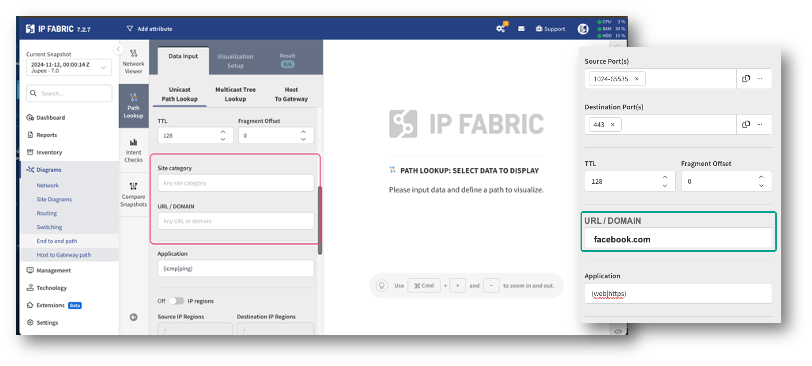
Run next-gen firewall simulations, and collect data from URL filters and threat feeds.
Analyze Transparent Firewalls
Organizations often implement transparent firewalls for an extra layer of security that doesn’t require changes to IP addresses or routing—with the added bonus that they’re difficult for threat actors to detect. However, this can be a double-edged sword, as it also means organizations might lose track of transparent firewalls themselves.
In IP Fabric, users can now incorporate insights about transparent firewalls from Forcepoint, Cisco Firepower, Fortinet, and Palo Alto Networks in their snapshots and path lookups.
Prove That Critical Paths Are Protected
IPSec tunnels are crucial for encrypting data in secure communication channels, as is required by leading security frameworks (e.g. ISO 27001), and regulatory standards (e.g. DORA, NIS2). IP Fabric offers detailed mapping and documentation of secure paths within IPSec tunnels, helping teams to identify unencrypted traffic, address gaps in defense, and automatically collect evidence to confirm that critical paths are secured.

Map, analyze, and document IPSec tunnels in your network snapshots.
Implement Access Controls for Security Extensions
Access controls are a key element of any Zero Trust approach. IP Fabric equips organizations with advanced tools to manage access controls for security extensions, allowing organizations to define permissions for critical actions like deploying and editing automation scripts. These controls not only help maintain compliance with security (e.g. NIST, ISO 27001) and regulatory (e.g. HIPAA, PCI-DSS) frameworks, but also prevent automation errors from propagating throughout the network.
Fine-Tune Custom Intent Checks
Start every day knowing that your network is secure and compliant by tracking intent checks in IP Fabric’s user-friendly dashboards. Checks are built on security best practices and compliance requirements to ensure that segmentation, device hardening, and other critical security controls are in place.
Organizations can now inject external data into attribute tables, so it can be used to enrich compliance checks. This data can also be used to tailor custom checks without needing advanced knowledge of code of query languages.

Track intent checks in IP Fabric’s user-friendly GUI.
Achieve End-to-End Network Governance
Whether you’re looking to strengthen your security posture or meet board-level compliance mandates, IP Fabric offers the insights to build proactive security and compliance into daily network operations.
- Close visibility gaps: Automatically uncover and remediate any gaps in network defenses, like bypassed firewalls or unencrypted data.
- Align IT and security teams: Leverage vendor-neutral insights and self-serve reporting so every team shares a common understanding of network behavior.
- Ensure audit readiness: Meet requirements for security and regulatory frameworks with automated, timestamped snapshots.
- Protect your bottom line: Reduce the risk of ransomware, fines, and other unplanned expenses to safeguard your organization’s budget.
In short, IP Fabric was built to help your organization focus on what matters most: protecting your network operations and setting the stage for future revenue-driving initiatives.
Take a Closer Look
Tune in to our upcoming webinar to learn how you can implement IP Fabric into your security strategy. In the meantime, you can always download our whitepaper on network security automation, and view the release notes in our documentation.