


Table of Contents
Earlier this year at Cisco Live, we asked hundreds of network engineers and managers a simple question: “Do you trust your CMDB?” The most common answer we got was something along the lines of: “Not much.”
Network teams want to rely on their CMDBs to tell them what exists in their network. However, CMDB discovery has a few structural gaps when it comes to complex, enterprise-scale networks. For example, it may not be able to discover all vendors, and it isn’t able to reliably map L2–L3 topologies. Both of these elements are essential for getting a complete picture of your network behavior.
With these two limitations in mind, it’s all too common for CMDBs to be wrong about 20-40% of your network. But what does this gap mean for CMDB health? Why does CMDB health matter? And how do we improve it? If you’ve found yourself asking these questions, read on; this is the blog you’re looking for.
Learn how IP Fabric discovers your network to help you validate your source of truth.
Why Does CMDB Health Matter?
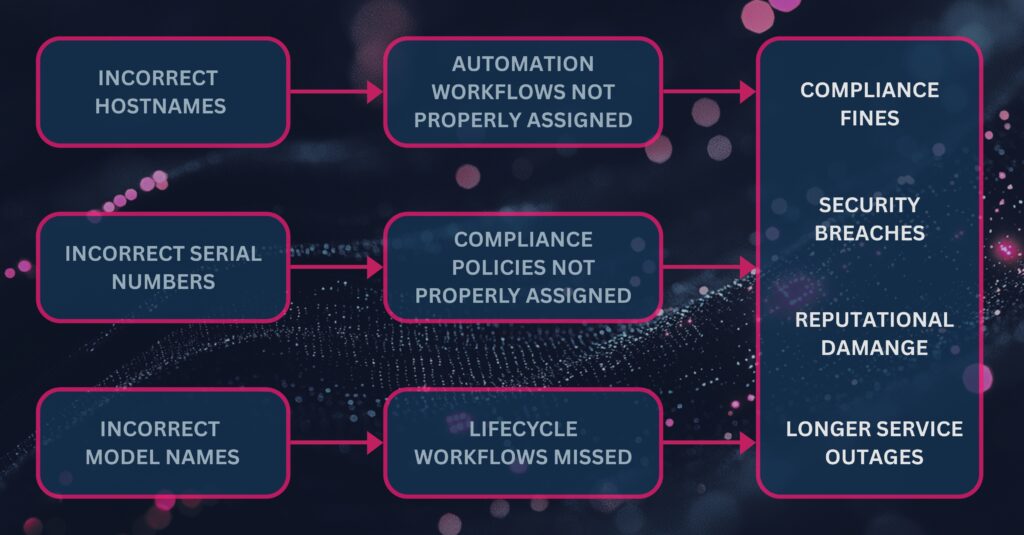
Your CMDB isn’t an isolated product in your ecosystem; it feeds into everything from lifecycle management to incident response. If your CMDB is inaccurate or outdated, it represents risk to your network operations, security, and compliance. Not to mention it also blocks any meaningful progress towards initiatives like adopting AIOps, rolling out SD-WAN, or embarking on mergers and acquisitions.
Let’s get into a real-world example of how CMDB health translates to your network. We recently encountered a customer where there was a 10% discrepancy between their production environment and their CMDB. That 10% discrepancy could be traced to:
- Increased risk of outages, which can cost $39,000 to $2 million per hour.
- Increased risk of regulatory noncompliance, which can cost $10-20 million per incident.
- Unnecessary maintenance and renewal fees, which cost them $300,000 per year.
- Unnecessary spend on network refreshes, which cost them $250,000.
CMDB health plays a pivotal role in eliminating these steep costs. The healthier your CMDB is, the fewer surprises you’ll encounter, and the less you’ll have to worry about unnecessary spend.
Learn more about the “Hidden Bill of Bad Data.”
How Do You Measure CMDB Health?
Think of CMDB health in terms of three key metrics:
- Accuracy: Does your CMDB match what’s actually going on in your network?
- Validity: Can you trace every entry back to observed network data?
- Availability: Is your CMDB data structured? Can it be used for future integrations and automations?
These three metrics can be boiled down to a single question: How well does your CMDB stack up against your network reality? If you don’t have an easy way to compare the two, odds are that your CMDB and your network reality differ pretty significantly, resulting in poor CMDB health.
Watch the full video on “How to Fix The Source of Truth Problem.”
What Do You Need To Improve CMDB Health?
In order to improve CMDB health, and build trust in your CMDB, you need to be able to validate your CMDB against an end-to-end view of your network. That means:
- Mapping your network behavior across all vendors and L1–L3 topologies from core to cloud to edge.
- Comparing your CMDB with this network reality to uncover any differences.
- Updating your CMDB accordingly.
- Scaling your approach for future integrations and automation.
IP Fabric’s ServiceNow integration was built by network engineers, for network engineers to cover these four requirements. Let’s dive into how it works.
Watch the full webinar on “Unlocking CMDB Accuracy: The Hidden Key to Cost Savings, Automation, and Risk Reduction.”
How Does IP Fabric’s ServiceNow Integration Improve CMDB Health?
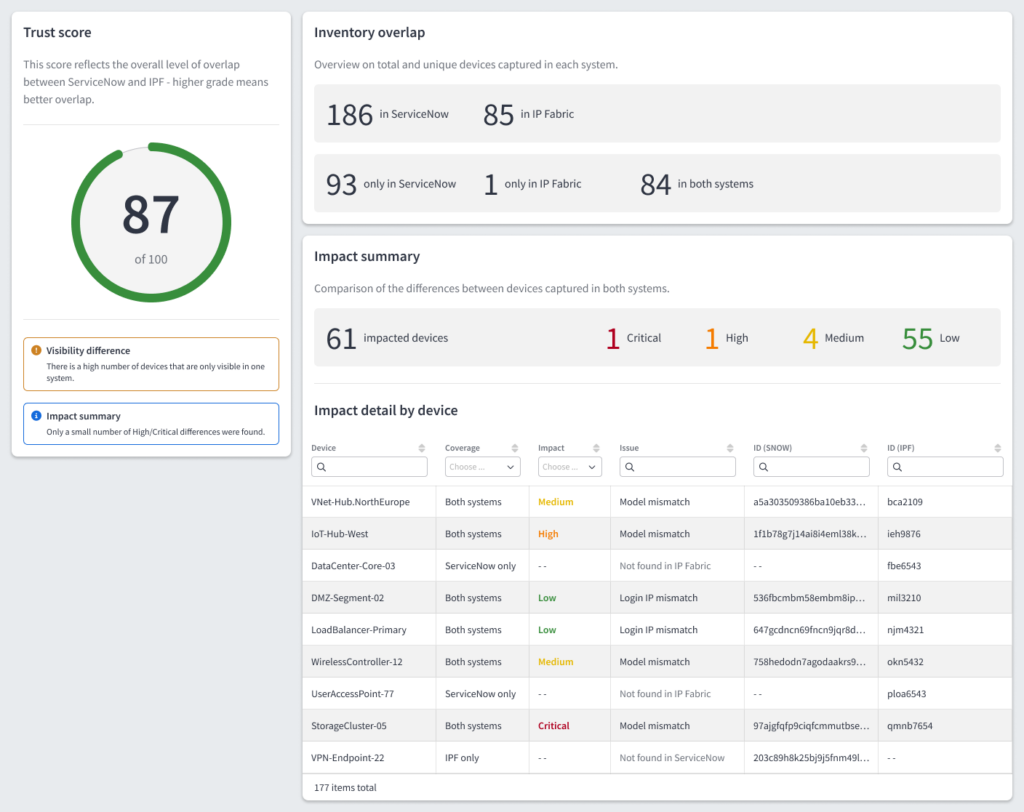
Meet IP Fabric’s ServiceNow integration. It calls IP Fabric’s REST API to collect and stage your actual network inventory—every device, cloud object, and dependency—inside your ServiceNow instance. From there, it maps IP Fabric’s network digital twin to the correct CMDB CI (Configuration Item) classes using standard ServiceNow transformation rules. The ServiceNow IRE (Identification and Reconciliation Engine) identifies existing CIs and inserts / updates records in order to keep your CMDB in sync with your actual network. All in all, it gives CMDB and network teams a shared, normalized view of CMDB health without requiring access to network devices. It does so via three key features:
- Device counts: See the total number of devices in IP Fabric and ServiceNow.
- Discrepancy breakdown: See which devices appear only in IP Fabric, only in ServiceNow, or in both with differences between them.
- Trust score: Summarize overall sync confidence between IP Fabric and your ServiceNow CMDB.
Here’s a sneak peek of the actual dashboard you’ll see in the integration:
Download IP Fabric’s ServiceNow integration in the ServiceNow marketplace.
Last, but not least, the integration bends to fit your environment, rather than the other way around. It connects directly through your MID (Management, Instrumentation, and Discovery) server, so it can run whether your IP Fabric instance is publicly reachable or tucked behind a firewall. Imports also run according to your schedule, with the default being every 24 hours at midnight.
Ultimately this integration ensures that your CMDB stays healthy by ensuring it’s always anchored to your actual network state and behavior. When you have verifiable proof that your CMDB is complete and up to date, you see benefits across three key areas:
- Change management: Lower the risk of outages and noncompliance during routine changes as well as large-scale projects like M&As, migrations, and rollouts.
- Compliance: Ensure that you have continuous proof of security and regulatory compliance for your CMDB environment, and avoid any unwanted surprises during audits.
- Cost savings: Cut operational waste (e.g. unnecessary maintenance fees) and reduce capital expenditures (e.g. network refreshes).
TL;DR: IP Fabric’s ServiceNow integration gives you a complete and normalized foundation of network data, which informs network operations, security, and compliance across the enterprise.
Want to try IP Fabric’s ServiceNow integration for yourself? Download it from the ServiceNow marketplace, or contact our team for more information!
FAQs
What’s the Difference Between IP Fabric and ServiceNow Discovery?
ServiceNow discovery reaches devices from the MID server. It leans on SNMP (Simple Network Management Protocol) data and CDP (Cisco Discovery Protocol) to read what each device reports about itself. This is effective for populating CIs (Configuration Items) across a broad IT estate, but it inherits the limits of those protocols. For example, it can only capture what a device advertises, so it tends to miss what sits between devices, like the dependencies you would see in L2–L3 topologies. ServiceNow’s discovery is also limited to certain vendors, which can leave gaps in your understanding of your network as a whole.
IP Fabric takes a different approach, logging into each device over CLI (Command Line Interface) or API to read configuration and state data. It then hops from device to device until all neighbors are found. The end product is a dynamic, vendor-neutral model of your L1–L3 topologies, which you can use to validate your ServiceNow CMDB.
How Do You Deploy IP Fabric’s ServiceNow Integration?
Deployment is straightforward and follows four steps:
- Install the app: Add IP Fabric’s integration to your ServiceNow instance via the ServiceNow marketplace, then enter your IP Fabric URL and API token.
- Choose your connectivity: Connect directly or through your MID server.
- Run the first import: Kick off an import manually and confirm that devices, adapters, and L1–L3 links populate the CMDB as expected.
- Schedule and validate: Turn on the scheduled import (which is set to midnight by default), and use the reconciliation dashboard to review your device counts, discrepancy breakdown, and trust score.
What Data Does IP Fabric Sync With ServiceNow?
IP Fabric syncs three layers of network data into the CMDB:
- Devices: Every discovered network device (e.g. routers, switches, load balancers, cloud objects) becomes a CI in the appropriate CMDB CI class.
- Interfaces & adapters: Port configurations, IP addresses, and adapter data is imported and linked to their parent device CI.
- L1–L3 links: Capture L1–L3 links between devices to get a complete, vendor-neutral map of your actual network state and behavior.
Imports run on a dependency chain with devices first, then adapters, then L1–L3 links. This ensures that records land in the right order. The chain runs at midnight by default, and can be scheduled to run with whatever cadence suits your environment.
How Does IP Fabric Help With ServiceNow Automation?
IP Fabric validates your ServiceNow CMDB against snapshots of your actual network, so any automated workflow that references your CMDB will be running based on the most current and complete network state. If IP Fabric detects a discrepancy between your CMDB and your network, it can be configured to automatically create and populate a ticket in your ITSM (IT Service Management) portal so your team has all the context they need to address it promptly.