
 Blog
Blog Infoblox recently announced NetMRI’s Last Order Date (LOD) will be April 30, 2025 and its End-of-Life (EOL) date will be April 30, 2027. Organizations need to start planning for a NetMRI alternative. Infoblox has certified IP Fabric as a modern successor for NetMRI, providing not only Network Configuration and Change Management (NCCM) capabilities but also delivering significant advancements in network, cloud, and security assurance.
To help Infoblox customers prepare for this announcement, we are proud to announce the upcoming integration between Infoblox’s NIOS (IPAM – IP Address Management) and IP Fabric 7.0 and above.
Migrating to IP Fabric
NetMRI has been a trusted NCCM and network discovery solution, but as it approaches sunset, it’s essential for organizations to adopt a solution that ensure operational stability, end-to-end network, cloud, and security visibility in multivendor environments, and design preparedness for the future – something that will help IT organizations to go beyond daily operations and provide them with the confidence to plan and execute key initiatives which better align with the business. IP Fabric stands out as a comprehensive assurance platform offering:
- Network, cloud, and security visibility: IP Fabric delivers full-picture snapshots and end-to-end path tracing across multi-vendor environments, providing granular insights into the configuration, state, behavior and interdependencies of the environment as a whole rather than data from individual devices lacking context.
- Automation and AI readiness: IP Fabric enables AI and automation initiatives by informing users and systems with normalized, structured data and then validates configurations, ensuring compliance and identifying risks before and after changes are deployed.
- Compliance and Risk Management: With increasing regulatory requirements, IP Fabric ensures that configurations adhere to standards like PCI, DORA, NIS2, NIST, and others. IT goes beyond regulatory compliance to ensuring proper alignment regardless of site, silo, or domain.
IP Fabric is more than a NetMRI Alternative
The technical integration with IP Fabric and Infoblox NIOS introduces a seamless way to sync IP addresses, networks and other descriptive data providing:
- Accurate IP Address Management: By synchronizing data between NIOS and IP Fabric, users can ensure their IPAM is always accurate and aligned with real network, cloud, and security information. IP Fabric doesn’t rely on manually maintained protocols like SNMP to discover devices, but rather gathers information about your network as a network engineer would, by going through each device and parsing information found in CLI and API commands. In a recent POC, IP Fabric discovered a 20% discrepancy between their SSOT (CMDB) and what IP Fabric was able to discover. If you don’t know about a device, or it’s misconfigured with incorrect hostnames and model information, you can’t secure or automate consistently.
- Enhanced Insights: Combining IPAM, and DDI (DNS, DHCP, IPAM), data from Infoblox with IP Fabric’s powerful assurance capabilities offers a unified view of health, compliance, and an assured security posture making it easier to move forward quickly without having to sacrifice with a larger attack surface.
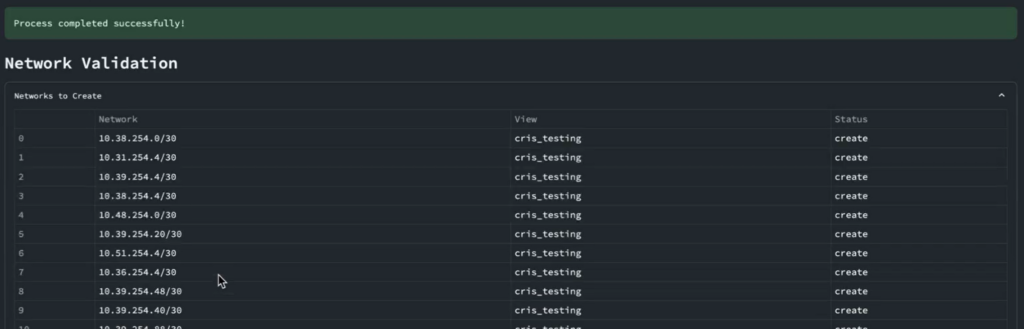
- What If Scenarios: Before syncing your network information, use the dry run feature in the IP Fabric information to show logging before syncing information into production. This will let you know about issues like overlapping networks and IP addresses before pushing information into production.
More than NCCM: The Power of Assurance
IP Fabric is not just a NetMRI alternative for NCCM capabilities, it’s a transformative solution that empowers organizations to take their digital transformation and business alignment to the next level. More than 25% of all IT projects are significantly delayed and run over budget by 2-4x according to a study called The Empirical Reality of IT Project Overrun Costs. This is due to hidden interdependencies within IT systems that IP Fabric brings into the light.
What’s Next?
As NetMRI approaches its LOD milestone, now is the time to plan your transition to IP Fabric. For more information about NetMRI’s lifecycle, visit the Infoblox ecosystem page. To learn more about IP Fabric’s capabilities, please reach out to our team to get started with the integration. You can check out the assurance capabilities of IP Fabric by using our Free Trial.