
 Blog
Blog Earlier this year at Cisco Live, we asked hundreds of network engineers and managers a simple question: “Do you trust your CMDB?” The most common answer we got was something along the lines of: “Not much.”
Network teams want to rely on their CMDBs to tell them what exists in their network. However, CMDB discovery has a few structural gaps when it comes to complex, enterprise-scale networks. For example, it may not be able to discover all vendors, and it isn’t able to reliably map L2–L3 topologies. Both of these elements are essential for getting a complete picture of your network behavior.
With these two limitations in mind, it’s all too common for CMDBs to be wrong about 20-40% of your network. But what does this gap mean for CMDB health? Why does CMDB health matter? And how do we improve it? If you’ve found yourself asking these questions, read on; this is the blog you’re looking for.
Learn how IP Fabric discovers your network to help you validate your source of truth.
Why Does CMDB Health Matter?
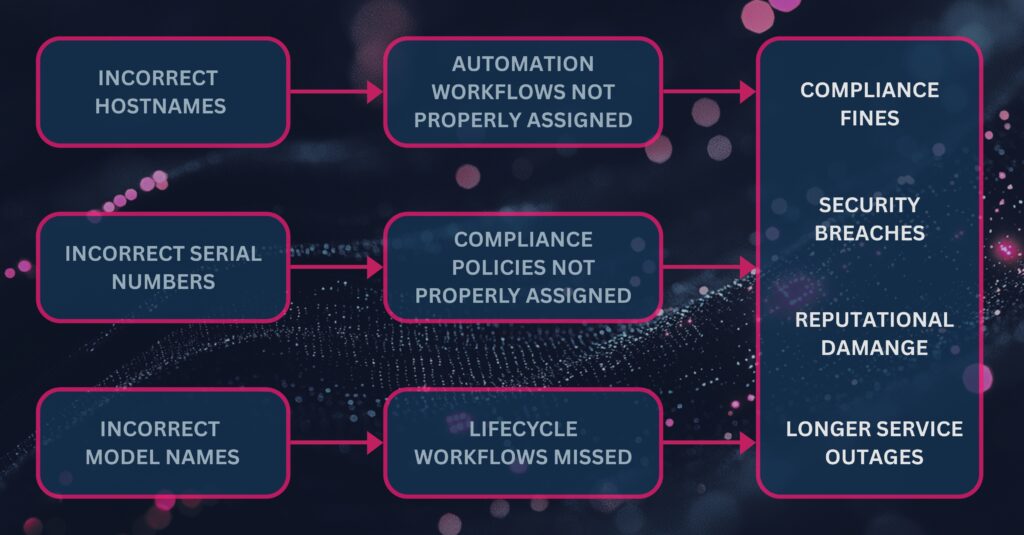
Your CMDB isn’t an isolated product in your ecosystem; it feeds into everything from lifecycle management to incident response. If your CMDB is inaccurate or outdated, it represents risk to your network operations, security, and compliance. Not to mention it also blocks any meaningful progress towards initiatives like adopting AIOps, rolling out SD-WAN, or embarking on mergers and acquisitions.
Let’s get into a real-world example of how CMDB health translates to your network. We recently encountered a customer where there was a 10% discrepancy between their production environment and their CMDB. That 10% discrepancy could be traced to:
- Increased risk of outages, which can cost $39,000 to $2 million per hour.
- Increased risk of regulatory noncompliance, which can cost $10-20 million per incident.
- Unnecessary maintenance and renewal fees, which cost them $300,000 per year.
- Unnecessary spend on network refreshes, which cost them $250,000.
CMDB health plays a pivotal role in eliminating these steep costs. The healthier your CMDB is, the fewer surprises you’ll encounter, and the less you’ll have to worry about unnecessary spend.
Transcript
anything in our our dashboards here uh
could be considered a price tag. So, you
know, end of end of sale, end of
support, that means that those devices
aren’t being updated anymore with
maintenance and security patches and
therefore I can attach a you know, a
security and compliance price tag to
that. Um other places where let’s say,
you know, Telnet isn’t built in. Um
devices with TNET access, if if Tnet’s
turned on, right, that’s another
security problem. fan module state I can
attach to outages. Um routing stability
again you know I can attach to outage
times and therefore uh risk as well as
you know loss of revenue. So, I would I
would challenge anyone to find just even
one intent check in here that doesn’t
have a price tag uh allocated to it
Learn more about the “Hidden Bill of Bad Data.”
How Do You Measure CMDB Health?
Think of CMDB health in terms of three key metrics:
- Accuracy: Does your CMDB match what’s actually going on in your network?
- Validity: Can you trace every entry back to observed network data?
- Availability: Is your CMDB data structured? Can it be used for future integrations and automations?
These three metrics can be boiled down to a single question: How well does your CMDB stack up against your network reality? If you don’t have an easy way to compare the two, odds are that your CMDB and your network reality differ pretty significantly, resulting in poor CMDB health.
Transcript
All right, good uh good afternoon
everyone. Uh I can see we still have some people are joining in so I’m going to start slowly. Um my name is
Sebastian. So thank you everyone for joining today. Um while people are still settling in uh
I’m going to start with something that I’ve heard a lot today also previously but it’s the question that someone we
will ask someone. It’s like how h how accurate is your CMDB? Can you trust it?
And today I actually had an interesting answer from from someone saying have you ever seen a CMDB that you can trust?
which I thought is quite funny but unfortunately where we entering
everywhere are talking about AI obviously automation as well both put them in the same bucket
that CMDB accuracy is going to become something that’s going to be critical for your project
um so most organization don’t really have uh a single source of truth for the
network because what’s going to happen is you’re going to have different versions of Right? You’re going to have
some of your information that’s going to be in your monitoring tool or in your CMDB, in your IPAM, some Excel
spreadsheet as well. So all that data give you part of the truth of what you have on your network. So each of those
are going to be important and they give you part of the information like I said
but the the problem is the are they cons consistent with each other and how often
do you keep them up to date so the reason why it’s hard to keep them up to date it’s because the network is
the only source of truth where your network is a decentralized or has information which is decentralized where
each of your switches, routters, firewall and all those pieces in your network contains information that you
want to gather in one place and this is what is difficult to capture this
information consistently. But for that what you need is the right tooling something that can actually help
by continuously validating the state of your network. uh but so validating but also
discovering those nodes that you have in your network without relying on those
manual updates uh because otherwise if you rely on those manual updates and you have to
const consistently updating those information and you don’t this is where you’re going to have that wrong
information wrong data and now with automation and AI if you trust your
automation to do some actions If they don’t have if that source of information
is incorrect, this is where the decision that’s going to be made based on that is also going to be incorrect. Now the
problem is the faster we are trying to go by automating doing things at scale.
Now what it means is that bad data and will generate bad decision and at scale
throughout your network. So this is where you need the right information to
be able to make the right decision. So what [clears throat] we’re going to
do is put ourselves in a very normal situation which I’m pretty sure most of
you are in a similar situation where at some point we can take the image of
you’ve joined a new network or you are a new company so you’ve got to look after a network that you don’t know yet or
you’ve been working in the same company for a number of years and now you’ve got a merger so you’re going to on board a
new network that you don’t know about or maybe someone is leaving the company and now you’ve got to look after a part of
the infrastructure that you’ve haven’t seen before or that last time you’ve checked it was a number of years ago and
it’s that thing where you don’t really know what you have and this is the image there is like it’s it’s guess work is
you think you know something people might give you some information this is saying this is our vis diagram this is
what our network looks like now you can manage it because you’ve got the data that you need but the reality is we’ve
all seen those um incident or changes that you would perform where the moment you start
your change window you’re about to do something and oh it’s weird it’s not how I’ve planned it
because maybe you were looking at that vis diagram and now you realize that ah that’s not the same what I’m seeing on
the device doesn’t match the vis diagram so now you’ve got to go back to oh what
what am I about to do am I about to break something if I apply my confusion
just the way it is. Do I need to review the actual config I’m going to apply?
And now you go back to the drawing board of saying, well, I need to go few step back looking at the current state of my
network. Can I still apply my change? And then you may or may not be in a in a
situation where if you’re still within your maintenance windows, you can still perform your change. If you’re not, it
could be a situation where you’ve got to say, “Well, I don’t have time to do it now, so I’ll roll back and I’ll try
again next week involving tester and all that things.” So, it’s a lot of wasted time just because you didn’t have the
right information to start with. So, how can we help? So now what we’re
going to do is try to imagine if you could get that understanding of that unknown or unsure that I fully know that
network in a minute in a few minutes rather than getting it throughout painful discovery and manual updates.
So what we’re going to do is trying to look at what does it look like to get that understanding in a few minutes. So
now what you’re seeing in here will look like a network diagram. But I’m going to say something is it’s
not just a network diagram. And the reason I’ve kind of mentioned it before is your visual diagram the moment you’re
going to click save you’ve got now you’re unsure that is it still going to
be up to date. Within the first few minutes hopefully it would still be but now after a few months a few years this
is where you’ve got the uncertainty. you don’t really know what you have.
So now the picture that you have there, this is what IP fabric will after
discovering your network will be able to discover what are the devices in your
infrastructure. But it’s not just about saying great I know that you’ve got a switch there and a router there. What we
are doing as well during the discovery is piecing that information together. So now the key part in here is really
having the relationship between your devices. It’s great to know that you’ve got 10,000 network devices, but what’s
really useful is to know how are they connected to each other. Where are the relationships? What could be the impact
if that device disappear or how how the application relying on the network.
[clears throat] So yeah, so the the key part in here is really the relationship.
So what we’re going to do they’re just looking at a specific site in here and
what we might be able to see here I don’t know how clear the image is for my angle it’s not but uh um [clears throat]
those relationship between devices where you see some in yellow you’re going to have your SPF your layer two further
down now if you are trying to do that manually this is the part where you connect to one device you do your show
ip whatever the command is you see some output and now you’re going to keep that
output in mind go to the next device do the same command and I’m trying to find is this this neighbor is it another one
and this is the part that takes time so now when we’ve done the discovery you don’t have to worry about it we’ve
done that relationship mapping we know how those devices are interconnected
so now this is where I’m going to see that as it’s the difference of knowing
what you own. So the devices that you have and how your network behaves or
operates
because the understanding the dependencies between your network is what really going to help you understand
the risk and the impact of a change or having a better understanding of an incident when such things happens. So
now what you’re seeing on the right hand side is a similar topology as the one that we see there which has been pushed
into service now with that dependency mapping of how are those devices connected. So now if you want to put
that in place into your CMDB, you can have the uh the affected CI that would
kind of say if I’ve got an incident affecting one of those devices, what are the dependents? What else could be
affected in my network? So now because as I can see we’re
showing in here, we understand [clears throat] sorry how things connect. But it also mean that if we can
show this, it also means that we’ve got a good understanding of what are those things. So going back a few step backs
is it starts with that inventory. I was talking about the relationship but if
[clears throat] we know the relationship it means we’ve got the understanding of the devices that we have in our network.
So in here what you have is a CMDB something that looks that maybe you have
the same in your Excel spreadsheet maybe you have that somewhere else in your source of truth. The main difference in
that situation is you haven’t done that manually that data is coming directly from the devices that we’ve discovered.
So no more I’ve mistyped a serial number and now I’ve got duplicate entries with
different ser number which is going to have an impact from a maintenance perspective. uh or the wrong um model number for for
a switch because I forgot that there was a a letter somewhere where the same model doesn’t have that letter. So
you’ve got information that’s available extremely quickly and that you can trust
because there is no more manual error when you’ve extracted that information.
Uh so that’s the example in what we had in IP fabric and now that’s the same information that has been pushed into a
CMDB. So that’s the example with service now and again with that you’ve got the
option now of having an accurate CMDB. So when you’ve got your security team, your cyber ops or depending on how we
want to call them and they’re going to say how many devices do we have that are running this OS and that version instead
of doing that guesswork before we say well we think we’ve upgraded the last
devices on that version and you’re not too sure. So what do you do? You’re probably going to spend some
time more or less quickly depending on your automation strategy if you’ve already got ways of gathering that
information but you still have to be involved as a as a network engineer to help that cyber security team to find
the right information where now if you’ve got that process where you’re pushing that and now your CMDB become a
place that they can trust because they know they’ve got up to date information in a good way. You’re out of the loop.
They want a question. They they’re asking a question. They know where to fetch the information. They don’t have
to come to you for can you check this now. Maybe they’ll come back to you only because it’s like well we’ve seen that
you’ve got three devices using that version that we should not have. Can you please correct this?
Um and I’ve mentioned service now but this is not the only place where having that upto-ate information matters.
and okay. Okay. Well, anyway, that in here what
I’m trying to show there is an example of other tools that we integrate with. So, you would have your not in the
background, Netbox slightly closer to the front where those
are the tools that we’re going to see when you want to build your source of truth of what is in your network. So
similar story as the CMDB but slightly different use case where you probably won’t be using your service now from an
automation strategy to know what are the villain configured on the devices what are the state of my interfaces the IPAM
now you probably want to focus on a more automation focused source of truth
[clears throat] or I mean I forgot to mention again in here but it’s or you could also put that
information somewhere in an Excel file but And there’s chances that uh that
file will become out of date the moment you send it to someone by email and now everyone’s going to create their own
final version v2 v3 which uh unfortunately I’ve seen way too many
times. Okay. So this is really what I’m trying to do there is the end goal is being
able to have simple information. If we think an inventory is a fairly basic information
automated where you now have a way of having that information populated in your different tooling of your ecosystem
so that you can make the right decision for the network team but that the right decision for the business to rely on.
Okay. [clears throat] So now we’ve seen that what the a good situation would
look like. How how do we get to that? So if it seems that we can get there, why
are we not there already? Why do we still hear people saying I do not trust my CMDB?
And [clears throat] there are several reason for this is
it’s not one of the reason that we know it’s not it’s not like people are bad at documenting is we can do network
documentation. It usually comes to other problem is first there is the always the
what I think we have on our network versus what we really have and this is that gap in between which the drift
between those two which create that delta which is going to cause some issues. So the drift is the main factor
for struggling to get that CMDB up to date because the network is going to
change. So despite having the best intention, there is always going to be a moment where a drift is going to appear
between what you have in your source of truth versus what you really have on your network.
So the the second um I guess issues with this or the the gap with that is the is
the impact for this is a cost. So there is a cost impact of not having that
correct information. I’ve mentioned earlier potentially having a change windows having to be rescheduled just
because of the wrong information. So those are not necessarily the the first and obvious one but there is that
time risk because without the right information you may create a change having side effect that you didn’t
foresee and financial as well because obviously if you create an an outage
there could be as well a financial repercussion of such issue and what we’re going to see as well is the why
now why do we need to start fixing that problem now and I’ve mentioned it briefly but obviously automation and AI
uh tooling that are coming more and more of uh at the moment and without the right
foundation it becomes very useful to to use them utilize them fully.
[snorts] Okay. So now [clears throat] let’s look a little bit more in detail in term of uh why do we diverge from the
reality. So the network is going to change continuously. We know that a
network never stays the same. There’s always going to be changes because users want to do something else. We need to
add villain, we need to configure whatever we the network is there to serve a purpose the business and then if
the business doesn’t change then there’s probably something that’s not going well. So generally speaking, we are
going to have to do changes to the network and that’s why I was mentioning that that drift is going to happen and
now is how do we control that drift and make sure we can document it back.
The another issue in term of the gap is manual updates. So when I’ve mentioned this is you do a change, you finish
late, you’ve done some quick test and now you’re like, “Oh, I haven’t got time to do the documentation.” It’s all
right. I saw that next week, tomorrow morning. But then we all know the reality is there’s probably going to be
another fire next time. And documentation can wait. And unfortunately, it’s often something that
keep being postponed until there is an incident and then we’ve got to go back
to the drawing board or some regularity audit. Someone wants to actually we need
to prove that we have documented our network and now this is where people are going to spend a huge amount of time to
update that information. So the relationship drift is really what
is the problem there where even if you think about that simple example of updating your vis diagram
because you’ve changed added a device somewhere it becomes difficult to also update
everything that’s kind of depending on those devices where it’s easy to add one device into a diagram but in term of is
the application going to be monitored somewhere do we know what else is changing by just adding that one device
and this is where there is that drift that becomes bigger where your monitoring tool for example may have an
understanding of the devices but without understanding the relationship in between.
So that was for the kind of the drift between the what you have on your network and documentation. Now we’re
going to look slightly more into the the cost like what’s the cost of the having that wrong information.
I’ve mentioned it is slower uh troubleshooting or more time to prepare
or plan or or or do a change perform a change windows including your post
checks as well. So everything is is going to tend to be a lot slower.
the risk I’ve mentioned as well where now having a change that’s not properly
managed is going to create those risk uh by you change something somewhere but
now you didn’t know that another application was also using this that you’ve affected and now you’ve got that
outage in your hand which could also cause that problem with the money
whether it’s going to be a fine or the example I’ve got in here as well is something and I’ll mention as well from
um a customer example people where what we did with them when they started P
with us they they they knew they had a big problem with their CMDB accuracy and
with a small gap and I’m just looking at the number I can remember but they’ve started with discovering around 400
devices and what they’ve realized once they’ve discovered those 400 devices and
compared that information with what they had in RCMDB they’ve realized that there was a 10% gap and by that I
10 extra uh 10% so around 40 devices inside service now which were not on the
network. So now it may not seem like a lot for some people they would say 40 is not too
bad but now that wasn’t the full scope for them. That was only a partial part of the network. Then they discovered the
full scope and obviously that gap did not go smaller. It tend to be even more.
But what does it mean in term of impact for them? It was just like what we have in our CMDB is what we’re going to use
for maintenance renewal. So it means that those number the information that
we have in service now it’s very possible that we are paying maintenance for it but those devices are not in
production. So now if you multiply I don’t know the cost but the average cost
of maintenance for a device but once you start multiplying by the number of phantom devices now you start thinking
oh that’s a huge amount of money that we’ve spent for absolutely no reason
but that’s only one side [clears throat] of the story. There is also the the other side of the story where it could
be the other way around where we would see a device in your network but it’s not in your CMDB and now slightly
different but now you don’t have any maintenance for it because maybe you don’t have it in your CMDB so the day
there is a problem you can’t easily contact the support so then there’s always that extra process because it’s
like well it’s not supported can we add the support the maintenance so not having that information is also
going to slow you or add extra processes or things that you have to perform.
Yeah. And um so so yeah, so it’s really finding that gap both ways of things that we have discovered and that maybe
are not in your documentation. The other example as well where outside of the
CMDB, it’s also what do you use to update and populate your monitoring tools. Now, if we’ve discovered a
network device that is not in your CMDB, are we sure that it’s fully monitored?
Is it on our monitoring system? Has it got the standard configuration that we were meant to be using? So, all those
questions can cause some impact as well.
Okay. And now the why now? Why do we need to do that change now? So, this is
the part where there is the the pace at which things changes. So we always
change the network and we need to do more changes and we don’t have time to go back. So yeah we keeping things
updated manually is not going to work. Now there’s also the regular regulatory
requirement where we have to be compliant with some specific framework
and for that we need to provide documentation because if we don’t we we know that
there’s going to be the the impact which could be fine uh depending on where you
are. Yeah, could be different framework but where the network has to show the documentation we have to show that we
are in control of our network. we we have control over it.
And the last one is going to be the automation and AI where we know that
human used to be what would do the cor the correction layer but now we are
doing more and faster using the help of automation and AI but like I’ve
mentioned if the inputs that you’re sending to your AI or automation is based on that wrong information you’re
just going to get not just the wrong output but also the wrong action that is going to
perform which can be uh causing more issues to your environment.
Okay. So now that we’ve defined the the problem and the potential solution, what
I want to know to to show now is going to be how how can we help with
validating this reality. So IP fabric
its role is going to like I’ve mentioned is going to be first to discover your network and this is where we go from a
very uh similar approach to the network engineer to find out what the devices
are in your network extract that information normalize that information because it
could be multi- vendor where you could have your fabric in your data center which is not going to use the same
technology as your campus or your plan or your firewall and all of that
information, it’s going to be brought into the same place with a similar
output. Because from our perspective, a routing table or a firewall policy
regardless of what device is behind it, it’s always going to look the same.
And now we’re able to do that verification as well because we’ve got that normalized data.
And finally once you’ve got and collected that data you can reconcile it with your ecosystem like we’ve mentioned
before whether it’s to push into one network source of truth your netbox or
equivalent and then from there that tool would now start populating different
system which could be now your CMDB your inventory your monitoring tools. So where everything now that you have your
correct representation of what you have in your network can be fully updated.
Okay. So before I start I’m going to move to a live the presentation of IP
fabric but also show some example of MCP. But before I do that, I just wanted to if if there are any question I want,
you know, please feel free to to ask because the goal of that live demo is something that I want to make sure like
you see something that you find useful. So feel free to ask any questions. Thanks.
And yeah, perfect. [clears throat]
Okay. So, so for this, so what I’m going to do, uh, sorry, I’ve just realized
this. Okay. Should be slightly more visible.
Okay. Can we see? Okay. At the back, I just want to make sure. Is that is that visible enough or would you prefer
bigger? No. Okay. Thank you. [snorts] Um, okay. So, now I’m in the UI of IP
Fabric and what we’re going to see here is different snapshot. The snapshot being what is produced after that
discovery. So discovery is IP fabric find what are the devices extract the
information and bring it into the UI or into the tool which we can then query.
So we’ve shown earlier this inventory table. Right now I’ve got my inventory.
I know what are my devices that I have. uh and if I filter for something like
this now I can see that I’ve got a mix of different platform from that same vendor and all that information is now
available I can query it as well via API so from a if I want to use that
information to push into different tool or different ecosystem I’ve got that
programmatic access to it so just to show the example I’m just going to take
the the net box but the information that we see for example in here in Netbox has
been pushed via plug-in that we’ve done with them to say take the information
from IP fabric put it in a new branch in Netbox show me the div and now what do
you want to do with that new branch do we merge it or not but now you’ve got that way of having that feedback loop of
I’ve got my source of truth networks is the data on the network still the
same or is there already some sort of drift that has happened where maybe if I look at one
device somewhere in here for example I don’t know it’s uh yeah is the IP
address that’s configured on that specific interface still this is what netbox is saying so what has been put
but what if someone has manually changed that information on my device now this is where you’ve got a drift you’ve got a
conflict of information where my source of truth netbox tells one thing but my
network tells something else now who’s right I don’t know. It depends. Was it
that IP change for a reason, a project, or was it an accident? Someone changed
something in net box that maybe should not have been updated that I don’t know. And this is where you might still need a
human to check the drift or if depending on what are the use cases and how you
plan on using it, maybe it’s actually the automation should take care of that
uh correction in that situation.
Okay. So that’s from the simple um CMDB I guess uh um updates. The the other
thing I wanted to to show now just to uh to have a better understanding. It was based on the the diagram. So we’ve we’ve
seen this topology which is a representation
of connection that we have between the devices. So now if I zoom to that same site that we had before now understand
my relationship I want to see what was connected to those devices at a specific moment in time I can go back to my
previous snapshot or the one from last week to see relationship that maybe were not present before. So if I zoom in into
those devices in this specific snapshot, I know if I go back to a previous
snapshot, I’m having links that were not present back then. So now if I wanted, I
could compare those two snapshot to say show me the difference again from a relationship perspective. And now that
would show me that between those two moments in time, new links have been added between those devices.
That’s from a relationship perspective. Now maybe I want to go further than that. It’s it’s great that I can see the
relationship between devices. But now I want to understand further how my
network behaves. So if I’ve got a user somewhere connected into one of my sites and maybe
the issue that I’m going to get is I’m going to receive a ticket from someone saying I cannot access a specific
application. So I’m going to use this one where I’ve got a source IP destination and someone is going to tell
me I’ve got an issue. I cannot access my destination. So now what IP Fabric will do in that
situation what we’ve collected from the devices is not just the configuration
but the state of those devices. So by that I mean it’s like we showed earlier the OPF relationship. You don’t get that
relationship just from the configuration. you need to look at the state of my SPF in that situation. But
we’re also collecting rooting table, art table, MAC address table which help us understand the forwarding that those
devices were doing at the time of that discovery. So in this example, we see that there is
a firewall that’s dropping this flow. But then what I can also see it’s what’s
happening further down the line and why that could be useful. So this one is a lot more from an operational
perspective. It would avoid potentially having the I receive a ticket, I open one firewall, I close the ticket, and
the next day you’ve got the user complaining that it’s still not working. Oh, we didn’t know that there was
another firewall further down the path. So now that we have this information, what we can do is perform the change. If
we want to change this, create the new snapshot and now we can have that
confirmation of how does it look like afterwards.
And that’s because I’m using the wrong one. So, so I was using the wrong port. I was on 3389 for different use cases.
So, okay. So, just to show again. So, now I’m on port 443.
That was the use case. So, before we actually had both firewall blocking the port 443 and after the change now we can
see that both firewall are green. So in that case the security has applied the
the policy correctly on both firewall. So now I’ve got confirmation that the pass is working.
Okay. And now the the last thing I wanted to show is going to compare
further that path lookup and show how an AI so an MCP server in our situation
with the help of LLM can use that data to provide I would say human readable
and not just as a diagram information that that would help with the understanding of what has changed on the
network. So this is the use cases where I need to go back to my
firewall in here. So now it’s a slightly different it looks the same. It’s a slightly different use case where now my
firewall in red is there for a compliance perspective where I do not want those users to be able to access
that destination on that specific port on RDP in that situation. So now what I’m seeing is my firewall is currently
blocking that flow and I’m happy because that’s what I wanted. But now what what happens on the next
snapshot? It looks pretty much similar but the firewall is no longer there. So in this
situation what happened is rooting has been done differently. So now the firewall is
being bypassed and we go directly to the next device. In reality, it could be something a lot more complex than this
where you perform a change and then there is something somewhere where now you’re going through you’re going to
route that network through a slightly different path and maybe instead of going through one firewall over there
the traffic is now going to use a different one which may not have the same rules in your firewall or like in
this case maybe you don’t even go through a firewall. So if you’re a compliance uh for looking at it from a compliance
perspective, you look at the firewall and it looks good because you’re blocking what you should be blocking,
but if your traffic doesn’t hit that firewall, that’s not going to achieve the the goal that you are trying to do
with this. So now in the in the example that we’ve done using the our MCP server
was we’ve asked to say show me the difference uh between those two snapshot
for this specific path. And what so in this one it was done by
close using the MCP server that we have with IP fabric where with that question
it generated an HTML report where I’m taking the source to destination pass
lookup from the previous snapshot and this is what we are seeing on the left
hand side and that looks like this is what we had on the on the graph earlier but we can
already see that it added that extra command to say now that device has been
removed when we look at the next snapshot. And now if we look at the the the next snapshot, we see that similar
format and now we’ve been highlighted in red that that firewall has been removed.
And now you’ve got clude who decided to make a a red warning about this to say
it looks like there’s been a firewall bypass with some explanation as well on from a rooting perspective that now we
are no longer going through the firewall but pointing directly to the device after. So now this is some sort of the
use case that you can start achieving because you’ve got information that you
can feed to an LLM via via the MCP server where without that correct
information it would be very difficult to use such uh such agent
because it won’t know how to get that information and that’s going to be I guess even more true when there when
you’re not using some sort controller for your network and that information is going to be spread throughout an
environment. Um, and probably the last thing before I
guess further question I want to show is something or maybe the second one was
similar past lookup but this one was an interesting topic that we had as well with few few people last yesterday about
the MTU as well. How can we put on top of that representation MTU information?
Because I want to ensure that my MTU is going to be consistent not just on the link to see that are both of my
interfaces configured the same way but now looking at it from a full path perspective.
And the last one is another classic use case that goes back to the CMDB
accuracy, your inventory. But this one was more from an end of life perspective where we already have that information
in IP fabric. It was just using the MCP and build uh a different visual for that
representation where now we’re looking for a specific snapshot where we would see which devices are now end of life or
end of maintenance. Uh I just wanted to bring it here to give the perspective
from that angle. And now this is the what the MCP took and the LLM decided to
create again a different reporting for that. But that information we would have so from the moment you do the discovery
to see that now we know what’s no longer up to date and as we mentioned with the
the customer I was mentioning earlier for them being able to see that information was a great help to say but
now we know that we can ask our management for further budget just because we’ve know we’ve got this
potential problem and we just need someone to say what do we do? Do we accept the risk that we’re running
devices that are no longer under support or if we don’t then we need to ensure
that we’re going to have the right budget so that we can work on the replacement for those.
Okay. Thank you very much. Are there any questions? Any comments?
Nope. Okay. Otherwise, if you’ve got any further question, you can always come and see us. If it’s to do more deep dive
from a an MCP server to see the what are the things that we can achieve with
those is obviously from our perspective the holidays. We haven’t released it publicly yet, but we’re doing some beta
testing or if it’s more from the use cases that where we can help as well,
feel free to come and see us in a in a world of solution. Thank you very much.
Watch the full video on “How to Fix The Source of Truth Problem.”
What Do You Need To Improve CMDB Health?
In order to improve CMDB health, and build trust in your CMDB, you need to be able to validate your CMDB against an end-to-end view of your network. That means:
- Mapping your network behavior across all vendors and L1–L3 topologies from core to cloud to edge.
- Comparing your CMDB with this network reality to uncover any differences.
- Updating your CMDB accordingly.
- Scaling your approach for future integrations and automation.
IP Fabric’s ServiceNow integration was built by network engineers, for network engineers to cover these four requirements. Let’s dive into how it works.
Transcript
We’ve seen organizations where they effectively set themselves back 12 months or even longer because the incumbent or the new provider can’t trust the enter documentation. And then they have to reverse-engineer the network and this costs time and excessive amounts of money. There’s initiatives like your AI and automation or agentic AI that need reliable sources of data and you can’t start those initiatives if you can’t trust your CMDB which would be the root for that data.
Watch the full webinar on “Unlocking CMDB Accuracy: The Hidden Key to Cost Savings, Automation, and Risk Reduction.”
How Does IP Fabric’s ServiceNow Integration Improve CMDB Health?
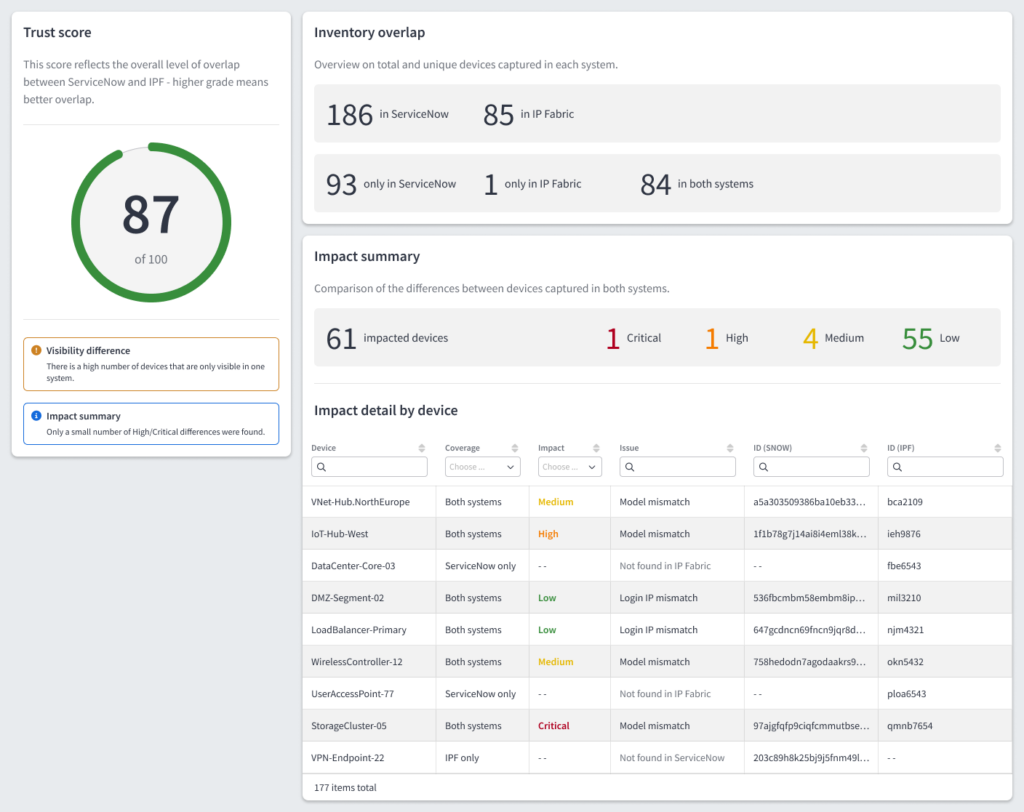
Meet IP Fabric’s ServiceNow integration. It calls IP Fabric’s REST API to collect and stage your actual network inventory—every device, cloud object, and dependency—inside your ServiceNow instance. From there, it maps IP Fabric’s network digital twin to the correct CMDB CI (Configuration Item) classes using standard ServiceNow transformation rules. The ServiceNow IRE (Identification and Reconciliation Engine) identifies existing CIs and inserts / updates records in order to keep your CMDB in sync with your actual network. All in all, it gives CMDB and network teams a shared, normalized view of CMDB health without requiring access to network devices. It does so via three key features:
- Device counts: See the total number of devices in IP Fabric and ServiceNow.
- Discrepancy breakdown: See which devices appear only in IP Fabric, only in ServiceNow, or in both with differences between them.
- Trust score: Summarize overall sync confidence between IP Fabric and your ServiceNow CMDB.
Here’s a sneak peek of the actual dashboard you’ll see in the integration:
Download IP Fabric’s ServiceNow integration in the ServiceNow marketplace.
Last, but not least, the integration bends to fit your environment, rather than the other way around. It connects directly through your MID (Management, Instrumentation, and Discovery) server, so it can run whether your IP Fabric instance is publicly reachable or tucked behind a firewall. Imports also run according to your schedule, with the default being every 24 hours at midnight.
Ultimately this integration ensures that your CMDB stays healthy by ensuring it’s always anchored to your actual network state and behavior. When you have verifiable proof that your CMDB is complete and up to date, you see benefits across three key areas:
- Change management: Lower the risk of outages and noncompliance during routine changes as well as large-scale projects like M&As, migrations, and rollouts.
- Compliance: Ensure that you have continuous proof of security and regulatory compliance for your CMDB environment, and avoid any unwanted surprises during audits.
- Cost savings: Cut operational waste (e.g. unnecessary maintenance fees) and reduce capital expenditures (e.g. network refreshes).
TL;DR: IP Fabric’s ServiceNow integration gives you a complete and normalized foundation of network data, which informs network operations, security, and compliance across the enterprise.
Want to try IP Fabric’s ServiceNow integration for yourself? Download it from the ServiceNow marketplace, or contact our team for more information!
FAQs
What’s the Difference Between IP Fabric and ServiceNow Discovery?
ServiceNow discovery reaches devices from the MID server. It leans on SNMP (Simple Network Management Protocol) data and CDP (Cisco Discovery Protocol) to read what each device reports about itself. This is effective for populating CIs (Configuration Items) across a broad IT estate, but it inherits the limits of those protocols. For example, it can only capture what a device advertises, so it tends to miss what sits between devices, like the dependencies you would see in L2–L3 topologies. ServiceNow’s discovery is also limited to certain vendors, which can leave gaps in your understanding of your network as a whole.
IP Fabric takes a different approach, logging into each device over CLI (Command Line Interface) or API to read configuration and state data. It then hops from device to device until all neighbors are found. The end product is a dynamic, vendor-neutral model of your L1–L3 topologies, which you can use to validate your ServiceNow CMDB.
How Do You Deploy IP Fabric’s ServiceNow Integration?
Deployment is straightforward and follows four steps:
- Install the app: Add IP Fabric’s integration to your ServiceNow instance via the ServiceNow marketplace, then enter your IP Fabric URL and API token.
- Choose your connectivity: Connect directly or through your MID server.
- Run the first import: Kick off an import manually and confirm that devices, adapters, and L1–L3 links populate the CMDB as expected.
- Schedule and validate: Turn on the scheduled import (which is set to midnight by default), and use the reconciliation dashboard to review your device counts, discrepancy breakdown, and trust score.
What Data Does IP Fabric Sync With ServiceNow?
IP Fabric syncs three layers of network data into the CMDB:
- Devices: Every discovered network device (e.g. routers, switches, load balancers, cloud objects) becomes a CI in the appropriate CMDB CI class.
- Interfaces & adapters: Port configurations, IP addresses, and adapter data is imported and linked to their parent device CI.
- L1–L3 links: Capture L1–L3 links between devices to get a complete, vendor-neutral map of your actual network state and behavior.
Imports run on a dependency chain with devices first, then adapters, then L1–L3 links. This ensures that records land in the right order. The chain runs at midnight by default, and can be scheduled to run with whatever cadence suits your environment.
How Does IP Fabric Help With ServiceNow Automation?
IP Fabric validates your ServiceNow CMDB against snapshots of your actual network, so any automated workflow that references your CMDB will be running based on the most current and complete network state. If IP Fabric detects a discrepancy between your CMDB and your network, it can be configured to automatically create and populate a ticket in your ITSM (IT Service Management) portal so your team has all the context they need to address it promptly.