
 Blog
Blog In our last blog, we covered how you can use extensions to run custom applications directly within the IP Fabric 7.0 user interface. Now let’s take it a step further by building a simple ‘Hello, World’ extension from scratch.
This hands-on guide will walk through the process of setting up and deploying your first extension in IP Fabric. Here’s what we’ll cover:
- Writing a basic Python script for an extension.
- Setting up a Dockerfile to containerize it.
- Deploying an extension in IP Fabric.
Ready? Let’s dive in.
How to Build Your Own Extension in 7 Steps
Step 1: Start in an Empty Directory
We need a clean working directory to organize our extension files. Run ls -alt to verify that the directory is empty before proceeding with the following:
❯ ls -alt
total 0
drwxr-xr-x@ 11 cristiancordero staff 352 Feb 10 16:43 ..
drwxr-xr-x@ 2 cristiancordero staff 64 Feb 10 16:43 .
Step 2: Create a Simple ‘Hello, World’ Script
This Python script prints Hello from hello_world.py! to the terminal:
def main() -> None:
    print("Hello from hello_world.py!")

if __name__ == "__main__":
    main()
Step 3: Create a DockerFile
We need a Dockerfile to run our extension as a containerized application. This Dockerfile will:
- Use Python Slim as the base image for efficiency.
- Copy our script into the container.
- Install uv, a modern dependency manager.
- Set up the entry point to run our script.
Speaking of our DockerFile:
FROM python:slim
WORKDIR /app
COPY . .
EXPOSE 80
RUN apt update && apt upgrade -y
# install UV
RUN pip install uv
ENTRYPOINT ["uv" , "run", "/app/hello_world.py"]
After running the above, your directory should look like this:
❯ ls -alt
-rw-r--r--@  1 cristiancordero  staff   172 Feb 10 19:53 Dockerfile
-rw-r--r--@  1 cristiancordero  staff   223 Feb 10 18:59 hello_world.py
drwxr-xr-x@  9 cristiancordero  staff   288 Feb 10 18:55 .
drwxr-xr-x@ 11 cristiancordero  staff   352 Feb 10 16:43 ..
Step 4: Build the Dockerfile
Before we can run our extension, we need to build a Docker image from our Dockerfile using this command:
docker build --progress=plain -t ipf_extensions_hello_world .This process will:
- Pull the base Python image (python:slim).
- Copy our script into the container.
- Install necessary dependencies (uv).
- Define how the extension runs inside the container.
Step 5: Test the Docker Image
Run a test with the following command:
docker run ipf_extensions_hello_worldOutput:
Downloading cpython-3.12.2-linux-aarch64-gnu (24.4MiB)
Downloaded cpython-3.12.2-linux-aarch64-gnu
Downloading pydantic-core (1.7MiB)
Downloaded pydantic-core
Installed 14 packages in 17ms
Hello from hello_world.py!
The output will confirm that our containerized script is executing as expected, which means that we have successfully built and run our first extension.
Step 6: Zip the Files
In the command below, we save the files Dockerfile and hello_world.py to a zipped file called ipf_extension.zip.
If you’re on macOS or Linux:
zip ipf_extension.zip Dockerfile hello_world.pyOutput:
updating: Dockerfile (deflated 15%)
updating: hello_world.py (deflated 25%)
Now that we’ve zipped the necessary files, the final step is to upload and activate our extension in IP Fabric.
Step 7: Deploy to IP Fabric
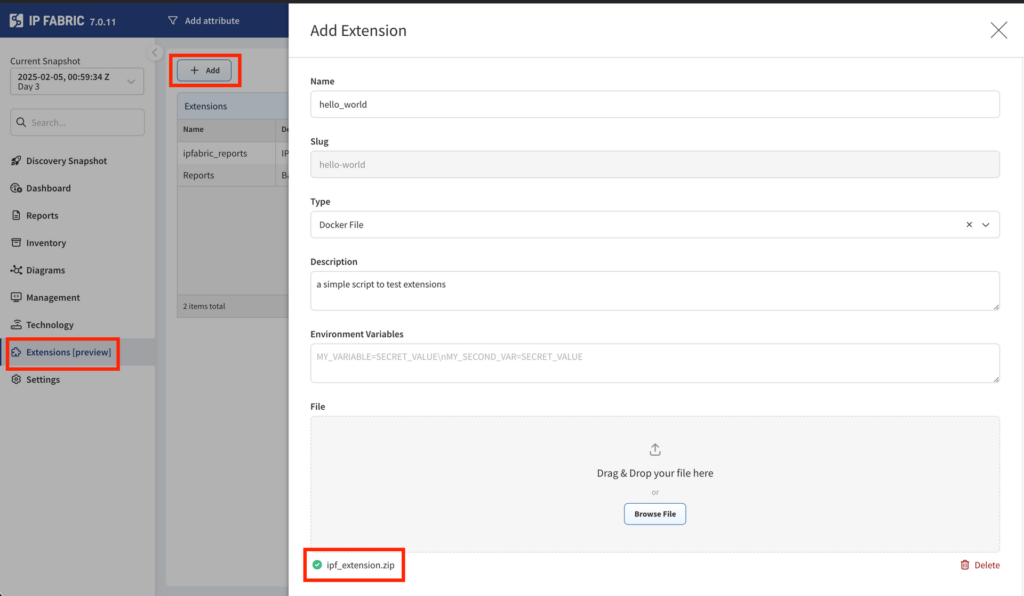
Activate our extension by accessing the “Extensions” tab in IP Fabric 7.0 or later, clicking “Add,” and dropping your zipped file.
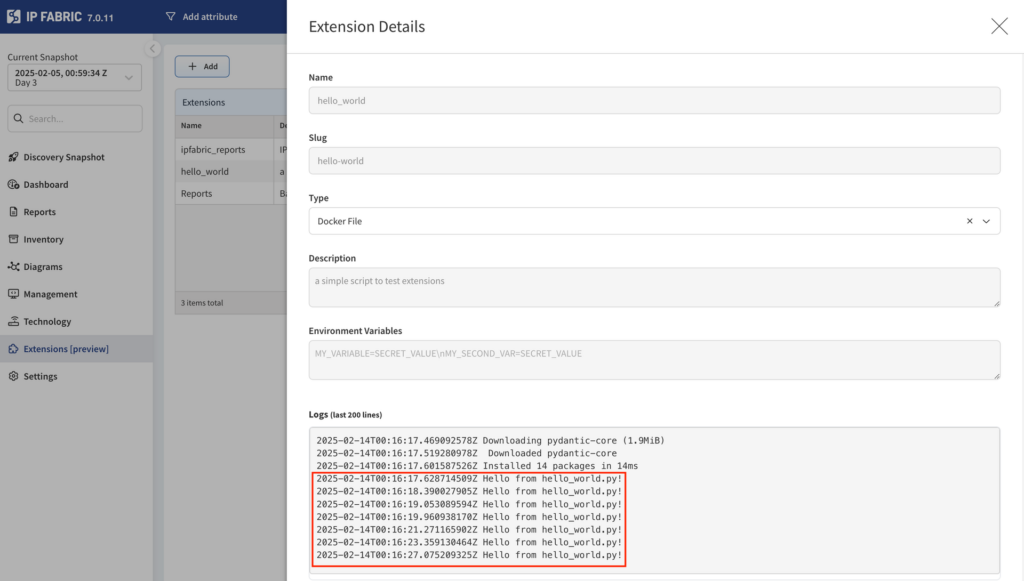
You should see Hello from hello_world.py! when you call your script.
What’s Next for Extensions?
By following these steps, you’ve learned the fundamentals of creating, containerizing, and running an extension within the IP Fabric platform.
Future posts in our “Extensions 101” series will dive deeper into more advanced use cases, optimizations, and ways to extend IP Fabric’s capabilities even further. Stay tuned!